# Shubhdeep Chhabra
> I build and experiment with web and AI systems, focusing on frontend, LLMs, and developer tools. Currently obsessed with DevTools.
- Website: https://okshubh.in
- GitHub: https://github.com/Shubhdeep12
- LinkedIn: https://www.linkedin.com/in/shubhdeepchhabra/
- X (Twitter): https://x.com/okshubhh
- Email: chhabrashubhdeep@gmail.com
---
# Shubhdeep Chhabra
Product Engineer · Frontend, Enterprise SaaS & Agentic AI · India · Remote
- Website: [okshubh.in](https://okshubh.in)
- GitHub: [github/Shubhdeep12](https://github.com/Shubhdeep12)
- LinkedIn: [linkedin/shubhdeepchhabra](https://www.linkedin.com/in/shubhdeepchhabra/)
- Email: [chhabrashubhdeep@gmail.com](mailto:chhabrashubhdeep@gmail.com)
- PDF: https://okshubh.in/resume/Shubhdeep_Chhabra.pdf
## Summary
Product engineer who figures things out. 5+ years building multi-tenant enterprise SaaS with React and TypeScript, turning ambiguity into shipped features: granular permissions for 50+ organizations, Lighthouse 20 to 85, and 60% faster CI builds. Open-source contributor to Resend and Sentry; now co-designing agentic test automation.
## Experience
### Senior Software Engineer · [American Technology Consulting (ATC)](https://atc.xyz)
*April 2026 – Present · Remote* — React 18, Rsbuild, TypeScript, LMS, Multi-agent AI
*Auzmor's engineering team moved to ATC (same ownership); continuing to build the Auzmor LMS platform.*
- Led migration from React 16/CRA/CRACO to **React 18 and Rsbuild**, cutting CI build time by **60%**.
- Co-designing a **multi-agent test automation system**: a goal-based explorer agent builds a product map of the web app, test cases are generated from it, and an executor agent runs them (in active development).
### Senior Software Engineer · [Auzmor Technology Pvt. Ltd.](https://auzmor.com)
*January 2025 – March 2026 · Remote* — React, TypeScript, RBAC, SSO/SAML, AI workflows
- Moved a role-only B2B product to **granular CRUD permissions**: mapped every app feature to permissions and built frontend enforcement, enabling custom roles for **50+ enterprise organizations**.
- Built frontend flows for **SSO/SAML**, **API key management** and user provisioning.
- Built the **AI-powered content generation** UI turning prompts and documents into learning material.
### Software Engineer III · [Auzmor Technology Pvt. Ltd.](https://auzmor.com)
*January 2023 – December 2024 · Remote* — React, Performance, WCAG 2.1 AA, Mentoring
- Built Mentorship, Interactive Training and Checklist features, helping increase platform engagement by **50%**.
- Raised the **Lighthouse performance score from 20 to 85** through code splitting and bundle optimization.
- Implemented **WCAG 2.1 AA** accessibility standards across the platform with design and product teams.
- Led **engineering design reviews**, mentored developers and set code review standards for the team.
### Software Engineer I · [Auzmor Technology Pvt. Ltd.](https://auzmor.com)
*December 2021 – December 2022 · Remote* — React, REST APIs, WebSockets, MFA
- Built a **multi-tenant branding system** for custom themes and white-labeled learning experiences.
- Built **social learning features** (posts, polls, eSignatures) using React, REST APIs and WebSockets.
- Built **multi-factor authentication** flows using SMS and email verification to strengthen platform security.
### Associate Software Engineer · [Accenture Solutions Pvt. Ltd.](https://www.accenture.com)
*January 2021 – December 2021 · Gurugram, Haryana, India* — React, JavaScript, Java, SQL
- Built and maintained **enterprise web applications** using React, JavaScript, Java, SQL and REST APIs.
## Skills
- **Languages:** JavaScript (ES6+), TypeScript, HTML5, CSS3
- **Frontend:** React, Next.js, Redux Toolkit, React Query, Tailwind CSS
- **Enterprise SaaS:** Multi-tenancy, RBAC & Permissions, SSO/SAML, OAuth, MFA, API Key Management
- **Performance & Accessibility:** Lighthouse, Core Web Vitals, Code Splitting, Lazy Loading, WCAG 2.1 AA
- **Architecture & Tooling:** Design Systems, Microfrontends, Monorepos, Rsbuild, CI/CD
- **APIs & Node:** REST APIs, WebSockets, Node.js (CLIs and tooling)
- **Agentic AI:** LLM Agents, Multi-agent Systems, MCP, Agent Skills & Plugins
## Open Source
### Resend (CLI + MCP Server)
- Contributed features and test coverage improvements to the official Resend [MCP Server](https://github.com/resend/resend-mcp/pulls?q=is%3Apr+is%3Amerged+author%3AShubhdeep12) and [CLI](https://github.com/resend/resend-cli/pulls?q=is%3Apr+author%3AShubhdeep12+is%3Aclosed)
- Built a personal open-source [CLI](https://www.npmjs.com/package/@shubhdeep12/resend-cli) for terminal-based Resend API interactions.
### Sentry Spotlight — [github](https://github.com/getsentry/spotlight/pulls?q=is%3Apr+is%3Amerged+author%3AShubhdeep12)
- Contributed improvements to Sentry Spotlight, an open-source local debugging and observability tool.
### Enterprise Design Systems
- Contributed merged improvements to [Kobalte](https://github.com/kobaltedev/kobalte/pulls?q=is%3Apr+is%3Amerged+author%3AShubhdeep12), [Razorpay Blade](https://github.com/razorpay/blade/pulls?q=is%3Apr+is%3Amerged+author%3AShubhdeep12), [Microsoft Griffel](https://github.com/microsoft/griffel/pulls?q=is%3Apr+is%3Amerged+author%3AShubhdeep12) and [Adobe React Spectrum](https://github.com/adobe/react-spectrum/pulls?q=is%3Apr+is%3Amerged+author%3AShubhdeep12).
## Education
### [Jaipur Engineering College and Research Center](https://jecrc.ac.in)
B.Tech in Electronics and Communication Engineering · August 2016 – August 2020 · CGPA: 7.2/10
---
# Hook, Skill, MCP, Subagent or AGENTS.md? A Decision Guide
> Every coding agent now gives you the same set of building blocks: instruction files, skills, MCP servers, hooks, subagents and plugins. They overlap just enough to be confusing. What each one is for, what it costs, and a simple way to pick.
- Author: [Shubhdeep Chhabra](https://okshubh.in)
- Published: 2026-10-20
- Categories: AI, Engineering, Tooling
- Reading time: 9 min read
- URL: https://okshubh.in/writings/hook-skill-mcp-subagent-decision-guide
---
After reading how these tools work, the question I keep coming back to isn’t "how do I write a hook?" or "how do I build an MCP server?".
It’s **"where should this go?"**
You have a rule, a workflow, or an integration, and you want your coding agent to use it. Claude Code, Codex, Cursor, Copilot, Gemini CLI and the rest all give you the same building blocks now, and they overlap just enough that it’s easy to put something in the wrong place. Then the agent "ignores" it and you don’t know why.
So this is the framework I use to decide. It works the same whichever agent you use.
---
## First: the building blocks, in one line each
- **Instruction file** (`AGENTS.md`, `CLAUDE.md`, `GEMINI.md`, Cursor rules, `copilot-instructions.md`): text loaded into every session.
- **Skill** (a `SKILL.md` folder): know-how the agent loads only when the task needs it.
- **MCP server**: tools and data from an external system, over a standard protocol.
- **Hook**: your program, run by the harness at a fixed point in the agent loop.
- **Subagent**: a separate agent with its own context window, its own instructions and its own tools.
- **Plugin**: a package that bundles any of the above so other people can install it.
For here:
**Instructions = always-on context. Skills = on-demand context. MCP = on-demand capability. Hooks = guaranteed behavior. Subagents = isolated context. Plugins = distribution.**
If you only remember that line, you’ll get most of these decisions right.
---
## Who decides, and what it costs
What really separates these is two things: **who decides when it runs**, and **what it costs you**.
| | Who decides it’s used | When it’s loaded | What it costs |
| --- | --- | --- | --- |
| Instruction file | Nobody, it’s always there | Every session | Tokens, every single session |
| Skill | The model (or you, via `/name`) | Name + description at start, body when needed | About 100 tokens per skill until used |
| MCP server | The model | Tool definitions at start, calls on demand | Tool definitions take context space |
| Hook | The harness | At its event, every time | A process per event, so latency |
| Subagent | The model (or you) | When delegated | Extra model calls, but a clean main context |
| Plugin | You, at install | n/a | Maintenance |
Some numbers to make this concrete:
- The Agent Skills spec puts a skill’s always-loaded part (name + description) at around 100 tokens, and recommends keeping the body under 500 lines.
- MCP tool definitions aren’t free. While reading [Entire](https://github.com/entireio/cli)’s source I found a note that running Copilot CLI with `--disable-builtin-mcps` (which skips loading the built-in GitHub MCP server) means about **28% fewer input tokens per call**. That’s a lot, for tools you might not even use.
- Hooks cost time, not tokens. Entire chose *not* to hook every file read, because starting a process for each `Read` would be the most expensive part of a turn.
---
## The questions, in order
When I have something new, I go through these in order and stop at the first "yes".
### 1. Must it happen every time, no exceptions?
→ **Hook.**
If skipping it even once is a bug, the model shouldn’t be the one deciding. Format after every edit. Block `git push --force` to main. Log every tool call for an audit. Check dependencies when a session starts.
Here’s the formatter one in Claude Code. The hook reads the edited file’s path from the JSON on stdin and formats just that file:
```json
{
"hooks": {
"PostToolUse": [
{ "matcher": "Write|Edit", "hooks": [{ "type": "command", "command": "jq -r '.tool_input.file_path' | xargs npx prettier --write" }] }
]
}
}
```
(How hooks work across agents, with the event names side by side, is in [Agent Hooks Are (Almost) the Same Everywhere](/writings/agent-hooks-same-everywhere).)
### 2. Does the agent need this in almost every session?
→ **Instruction file.**
Build and test commands. "We use pnpm, not npm." The folder layout. Things that are short, stable, and relevant to nearly any task. Keep this file small. Every line is paid for in every session, and a long file gets skimmed by the model the same way it gets skimmed by people.
### 3. Is it a procedure or know-how that’s only needed sometimes?
→ **Skill.**
"How we write PR titles." "How to cut a release." "How to triage a security advisory." The agent only loads it when that task comes up, so you can be as detailed as you want without paying for it in every session. If part of it is deterministic, put that part in a script inside the skill and let the skill call it.
The PR conventions example from my [CLI vs MCP post](/writings/cli-mcp-ai) is a classic skill.
### 4. Does it need live data, auth, or a system without a CLI?
→ **MCP server.**
Querying a production database, pulling a Sentry issue, posting to Slack, anything behind OAuth, anything where the agent has no shell (a browser, a serverless function). If there’s already a good CLI and the agent has a terminal, the CLI is often enough. That was basically the whole point of my March post.
(If you build MCP servers, note that the 2026-07-28 spec made the protocol core stateless, so check what your SDK supports.)
### 5. Will it read a lot when you only need the conclusion? Or can it run in parallel?
→ **Subagent.**
"Find every place we parse dates." "Review this diff for security issues." "Migrate these 40 files." A subagent does all the reading in its own context and gives back a summary, so your main conversation stays clean. You can also limit its tools. Copilot’s custom agents, for example, can get a restricted tool set, so a reviewer agent can’t edit code.
### 6. Do other people need several of these together?
→ **Plugin.**
Plugins don’t add a new capability, they package the others. Claude Code, Codex, Cursor, Copilot CLI, Gemini CLI (as extensions) and Antigravity all have them now.
---
## Some examples
| You want... | Put it in | Why |
| --- | --- | --- |
| Run the formatter after every edit | Hook (`PostToolUse`) | Must happen every time |
| Block force-pushes to main | Hook (`PreToolUse`, exit `2`) | A policy, not a suggestion |
| "Use pnpm, not npm" | Instruction file | Short, needed in almost every session |
| Our PR title and label conventions | Skill | Detailed, only needed when opening PRs |
| Query prod Postgres, read-only | MCP server | Live data, auth, a long-lived connection |
| Fetch the Sentry issue for this stack trace | MCP server | External system, auth |
| Security review of a diff | Subagent with read-only tools | Lots of reading, only the verdict matters |
| Check deps for new CVEs at session start | Hook + skill | The hook makes sure it runs, the skill knows what to do with the result |
That last row matters: **real things are usually combinations.** A dependency-security check might be a skill (the know-how), a script (the logic), a hook (the guarantee that it runs) and a plugin (so people can install it). A code review agent might be the `git` CLI for the diff, a Sentry MCP server for production errors, and a GitHub MCP server for the comments.
---
## Common mistakes
**Putting judgment in a hook.** Hooks are great at "always" and bad at "it depends". A hook that tries to pull package names out of shell commands will happily read `npm i vite 2>&1` as a package called `2`. Working out what a command *means* is the model’s job, so that kind of thing belongs in a skill.
**Putting a must-happen rule in an instruction file.** "Always run tests before finishing" in `AGENTS.md` will be followed most of the time. If "most of the time" isn’t good enough, it’s a hook. In Claude Code, for example, a `Stop` hook can block the agent from finishing and tell it why.
**A giant instruction file.** If your `AGENTS.md` has a 200-line section on the release process, that’s a skill sitting in the wrong place.
**One MCP tool per API endpoint.** Hundreds of tool definitions eat the context window before the agent has done anything. Fewer, higher-level tools work better, or the code-mode approach I mentioned in March.
**A subagent for a two-line task.** Subagents cost extra model calls and don’t have your conversation’s context. Use them when the isolation actually helps.
**Trusting text from outside.** Anything a hook, skill or MCP server pulls into the model’s context from the internet (issue titles, package descriptions, web pages) can contain instructions. Label it as untrusted data.
---
## The short version
1. Must always happen → **hook**
2. Needed in every session → **instruction file**
3. Needed sometimes, and detailed → **skill**
4. Needs live data or auth → **MCP server**
5. Lots of reading, small answer → **subagent**
6. Sharing a bundle → **plugin**
**Instructions tell. Skills teach. MCP connects. Hooks enforce. Subagents focus.**
My main takeaway from reading how these tools work is that they look very different from the outside, but they’re all the same loop with the same building blocks. Learn the blocks once and switching agents stops feeling like starting over.
I hope you find this helpful. If you have a case that doesn’t fit any of the six, I’d really like to hear it. Find me on [X (@okshubhh)](https://x.com/okshubhh).
---
# Agent Hooks Are (Almost) the Same Everywhere
> Claude Code, Codex, Cursor, Copilot CLI and Gemini CLI all let you run your own code at points in the agent loop, and they have ended up with almost the same protocol. The shared part, the event names side by side, and how to write a hook that works in more than one tool.
- Author: [Shubhdeep Chhabra](https://okshubh.in)
- Published: 2026-09-15
- Categories: AI, Engineering, Tooling
- Reading time: 12 min read
- URL: https://okshubh.in/writings/agent-hooks-same-everywhere
---
Claude Code, Codex, Cursor, Copilot CLI, Gemini CLI. Open their hook docs one after another and it starts to feel like reading the same page with the words rearranged.
To check whether that was only an impression, I read the source of [Entire](https://github.com/entireio/cli), a tool that installs hooks into eight different coding agents. If anyone has had to deal with all the differences, it’s them. And the impression held: hooks have quietly become the same thing everywhere. Same idea, same input format, and (where it matters) the same "exit 2 means no". Mostly different spelling.
This post is that shared part, a side-by-side table of the events, and the differences that will actually bite you.
**The short version, if you’re in a hurry:**
- A hook is a command the harness runs at a fixed point in the agent loop. Config is `event → matcher → command`.
- The harness writes a JSON payload to your script’s stdin.
- Exit `0` means continue. Exit `2` means "no", with stderr as the reason. On a *before* event (`PreToolUse`, prompt submit) that blocks the action. Any other exit code is a warning, not a block.
- Event names differ (`PreToolUse` vs `preToolUse` vs `BeforeTool`), but the moments are the same.
- Set your own timeout, exit `0` on your own bugs, and test the script by piping JSON into it.
---
## First: what a hook is
Every coding agent runs the same loop:
```
session start
→ you send a prompt
→ model thinks → calls a tool (read file, edit, run shell) → reads the result → repeat
→ model stops and answers
→ (context gets full → compaction)
session end
```
A hook is your own program that the harness runs at one of those points. "Before any tool runs." "When the user submits a prompt." "When the session starts."
The big difference from skills or instructions: the model doesn’t decide whether a hook runs, the harness does. Write "always run the formatter" in `AGENTS.md` and the model will do it most of the time. Put the formatter in a hook and it runs every time.
For here: **instructions are suggestions, hooks always run.** A hook guarantees your code gets a say at that moment. It doesn’t guarantee the outcome, because the hook can have bugs or miss a path (more on that below).
---
## The shared protocol
Claude Code shipped this shape first, and most of the others now follow it pretty closely.
### 1. Config: event → matcher → command
```json
{
"hooks": {
"PreToolUse": [
{
"matcher": "Bash",
"hooks": [{ "type": "command", "command": "./scripts/guard.sh", "timeout": 10 }]
}
]
}
}
```
- The **event** is *when* (`PreToolUse`).
- The **matcher** filters *which* (only the `Bash` tool).
- The **command** is *what* runs.
### 2. Input: JSON on stdin
The harness runs your command and writes a JSON payload to its stdin. The common fields look like this (this is Codex’s `PreToolUse`, Claude Code’s is very close):
```json
{
"session_id": "550e8400-e29b-41d4-a716-446655440000",
"transcript_path": "/Users/me/.codex/rollouts/.../rollout-....jsonl",
"cwd": "/path/to/repo",
"hook_event_name": "PreToolUse",
"tool_name": "Bash",
"tool_input": { "command": "ls -la" }
}
```
### 3. Output: exit code first, then JSON
| Exit code | Meaning |
| --- | --- |
| `0` | Success. Stdout can contain JSON with a decision or extra context |
| `2` | "No". On a before-event the action is stopped. Stderr is the reason, and the model sees it |
| anything else | Non-blocking error. The harness warns and carries on |
Exit `2` is the "no" signal in Claude Code, Cursor and Gemini CLI. I haven’t confirmed it for the others, so check their docs. What it *does* depends on the event:
- **Before events** (`PreToolUse`, prompt submit): the action is blocked.
- **After events** (`PostToolUse`): the action already happened, so stderr is only fed back to the model.
- **`Stop`**: exit `2` means "not done, keep working", not "block".
If you remember one rule from this post, make it this one, because **exit `1` does not block.**
### A tiny hook that works
A guard that stops the agent from writing to `.env` files. It reads the path from the payload and blocks anything that looks like a secrets file, except `.env.example`:
```bash
#!/usr/bin/env bash
# protect-env.sh: block edits to .env files
# Claude Code sends tool_input.file_path, Cursor sends tool_input.path
# This is a security guard, so it fails closed: no jq means no edit.
command -v jq >/dev/null || { echo "protect-env: jq is required" >&2; exit 2; }
file=$(jq -r '.tool_input.file_path // .tool_input.path // ""')
case "$(basename "$file")" in
.env.example) ;;
.env | .env.*)
echo "Blocked: $file holds secrets. Ask the user to change it themselves." >&2
exit 2
;;
esac
exit 0
```
Read stdin, decide, exit. That’s the whole contract. Register it on `PreToolUse` with a `Write|Edit` matcher in Claude Code, or on the equivalent event from the table below in your other tools.
You don’t need an agent to test it. Pipe a payload in and check the exit code:
```bash
echo '{"tool_input":{"file_path":"/repo/.env"}}' | ./protect-env.sh; echo $? # prints the reason, then 2
echo '{"tool_input":{"file_path":"src/app.ts"}}' | ./protect-env.sh; echo $? # 0
```
One honest caveat. A hook like this stops the *edit tools*. It doesn’t stop the agent from running `echo KEY=x >> .env` through the shell, so pair it with a `Bash` matcher if that matters to you. Hooks are a guardrail, not a sandbox. Also note the `jq` check at the top: if `jq` is missing, the shell exits `127`, which is just a warning, and the edit would go through. A guard has to fail closed on its own, which is why it checks first.
### Richer answers with JSON
Exit codes are just yes or no. When you need more, print JSON on stdout and exit `0`. In Claude Code, for example:
```json
{
"hookSpecificOutput": {
"hookEventName": "PreToolUse",
"permissionDecision": "deny",
"permissionDecisionReason": "Database writes are not allowed in this repo"
}
}
```
With JSON you can also rewrite the tool’s input (`updatedInput`), ask the user instead of deciding yourself (`"ask"`), or add context for the model (`additionalContext`). More on that last one below.
---
## The events, side by side
These are the main events in the six harnesses that use a config file. The names come from each tool’s docs and from Entire’s integration code. Claude Code, Codex and Factory Droid use the same names, so they share a column.
| Moment | Claude Code, Codex, Factory Droid | Cursor | Copilot CLI | Gemini CLI |
| --- | --- | --- | --- | --- |
| Session starts | `SessionStart` | `sessionStart` | `sessionStart` | `SessionStart` |
| Prompt submitted | `UserPromptSubmit` | `beforeSubmitPrompt` | `userPromptSubmitted` | `BeforeAgent` |
| Before a tool | `PreToolUse` | `preToolUse` | `preToolUse` | `BeforeTool` |
| After a tool | `PostToolUse` | `postToolUse` | `postToolUse` | `AfterTool` |
| Turn ends | `Stop` | `stop` | `agentStop` | `AfterAgent` |
| Before compaction | `PreCompact` | `preCompact` | n/a | `PreCompress` |
| Subagent starts | `SubagentStart` | `subagentStart` | `subagentStart` | n/a |
| Subagent ends | `SubagentStop` | `subagentStop` | `subagentStop` | n/a |
| Session ends | `SessionEnd` | `sessionEnd` | `sessionEnd` | `SessionEnd` |
One exception to the shared column: Factory Droid only has `SubagentStop`, not `SubagentStart`.
Read across a row and you can see how close they are. Read down the columns and you see the casing split: PascalCase (Claude Code, Codex, Factory, Gemini CLI) vs camelCase (Cursor, Copilot CLI).
On top of that shared core, each tool has its own extras:
- **Claude Code** has the most: 33 events as I write this, including `PermissionRequest`, `PostToolUseFailure`, `PreModelSwitch`, `FileChanged` and `WorktreeCreate`.
- **Cursor** has fine-grained ones like `beforeShellExecution`, `beforeMCPExecution`, `beforeReadFile`, `afterFileEdit` and `afterAgentThought`, plus hooks for Tab completions.
- **Gemini CLI** can hook the model call itself: `BeforeModel`, `AfterModel`, `BeforeToolSelection`.
- **Codex** has `PermissionRequest` and `PostCompact`.
Two harnesses don’t use a config file at all. OpenCode and Pi take plugins written in TypeScript/JavaScript that subscribe to events in-process: `session.created` and `session.compacted` in OpenCode, `session_start`, `tool_call` and `agent_end` in Pi. Same loop, different API.
---
## Where they differ (the parts that bite)
### Where the config lives
| Harness | Hook config |
| --- | --- |
| Claude Code | `.claude/settings.json` (or `hooks/hooks.json` in a plugin) |
| Codex | `.codex/hooks.json` or `~/.codex/hooks.json` |
| Cursor | `.cursor/hooks.json`, `~/.cursor/hooks.json`, plus team and enterprise levels |
| Copilot CLI | every JSON file in `.github/hooks/` |
| Gemini CLI | `.gemini/settings.json` |
| Factory Droid | `.factory/settings.json` |
| OpenCode | a plugin file in `.opencode/plugins/` |
| Pi | an extension in `.pi/extensions/` |
### How the command is written
Most use `"type": "command"` with a `"command"` string. Copilot CLI is the odd one: it uses a `"bash"` key (and `"powershell"` for Windows), plus `"version": 1` at the top:
```json
{
"version": 1,
"hooks": {
"sessionStart": [{ "type": "command", "bash": "./scripts/on-start.sh", "timeoutSec": 30 }]
}
}
```
### What kind of handler you can use
- **Claude Code**: five types. `command`, `http` (POST the payload to a URL), `mcp_tool` (call a tool on an MCP server), `prompt` (a single LLM yes/no call) and `agent` (a subagent with tools, still experimental).
- **Cursor**: `command` and `prompt`.
- **Gemini CLI**: `command` only.
### The JSON you write back
Same ideas, different field names. Claude Code nests everything under `hookSpecificOutput` in camelCase (`permissionDecision`, `additionalContext`, `updatedInput`). Cursor uses flat snake_case (`permission`, `user_message`, `agent_message`, `updated_input`, `additional_context`). So if you return JSON, you’re writing it once per harness.
### Timeouts
The defaults are all over the place. Claude Code’s command hooks default to 600 seconds but drop to 30 on `UserPromptSubmit`. Gemini CLI’s default is 60000, and that’s milliseconds. Copilot’s `timeoutSec` defaults to 30. Codex caps `SessionEnd` at 3 seconds. Just set the timeout yourself, every time.
---
## Two ways to talk back
A hook can send text to two different audiences, and it helps to keep them apart in your head:
- **The user**: a message shown in the UI. Claude Code and Codex call it `systemMessage`.
- **The model**: text added to the model’s context. Claude Code, Codex and Gemini CLI return it as `hookSpecificOutput.additionalContext` on the prompt-submitted event (`UserPromptSubmit`, or `BeforeAgent` in Gemini). Claude Code also accepts it on `SessionStart` and several other events, and plain text printed by a `SessionStart` hook goes into context too.
The in-process harnesses do the model side their own way: OpenCode plugins can edit the system prompt through `experimental.chat.system.transform`, and Pi extensions can send a message at `before_agent_start`.
Entire actually has two separate interfaces for this in its code, one for "show the user" and one for "tell the model". I’d copy that. Mixing them up is how debug text ends up in the model’s context.
And one warning. Anything you add to the model’s context is a prompt-injection surface. If your hook passes along text from the internet (package descriptions, issue titles, web pages), label it clearly as untrusted data, not instructions.
---
## They’re starting to read each other’s configs
It’s not only the shape that’s converging. The tools are reading each other’s stuff now:
- **Cursor can load Claude Code hooks** (it calls them "third-party hooks"), sets `CLAUDE_PROJECT_DIR` as an alias, and matches Claude Code’s exit `2` behavior.
- **Codex** hook payloads include a `permission_mode` field with the values `default`, `acceptEdits`, `plan`, `dontAsk` and `bypassPermissions`. Those are Claude Code’s permission mode names.
- **Copilot CLI** can install plugins from Claude-style marketplaces.
---
## Writing one hook for several tools
If you want one script to work across harnesses, this is what I’ve found works:
**1. Read the payload defensively.** The same thing has different field names:
```js
// normalize.mjs: read the hook payload from any of the common harnesses
const raw = await new Promise((resolve) => {
let data = '';
process.stdin.on('data', (chunk) => (data += chunk));
process.stdin.on('end', () => resolve(data));
});
let input = {};
try {
input = raw ? JSON.parse(raw) : {};
} catch {
process.exit(0); // fail open: never break the session over a bad payload
}
const sessionId = input.session_id ?? input.sessionId ?? input.conversation_id; // Claude/Codex, Copilot, Cursor
const cwd = input.cwd ?? input.workspace_roots?.[0] ?? process.cwd(); // Cursor sends workspace_roots
const event = input.hook_event_name ?? process.argv[2]; // Copilot's payloads don't include it, so pass it as an argument
```
**2. Don’t depend on `transcript_path`.** It’s `null` in Cursor’s CLI and in Codex’s ephemeral mode, and Copilot only sends `transcriptPath` on `agentStop`.
**3. Read both env var spellings.** `CLAUDE_PROJECT_DIR || PROJECT_DIR`, `CLAUDE_PLUGIN_ROOT || PLUGIN_ROOT`. Claude Code uses the `CLAUDE_` names and some other harnesses use the plain ones (Codex plugins get `PLUGIN_ROOT`, for example). Reading both is what lets a single `hooks.json` work in more than one tool.
**4. Keep decisions in exit codes.** Exit `2` with a reason on stderr works in the most places. JSON output is where all the per-tool differences live.
**5. Pick fail-open or fail-closed on purpose.** A formatter or logger should fail open: if it crashes, exit `0`, because a broken helper shouldn’t kill someone’s session. A security guard should fail closed: if it can’t do its check (missing `jq`, bad payload), exit `2`.
**6. Keep it fast.** Every hook is a new process at that point in the loop, and a hook on every file read adds up fast. Entire decided *not* to hook every `Read` for exactly this reason.
---
## Wrap
**Same loop. Mostly the same exit code. Different spelling.**
If you learn hooks in one harness, you’ve mostly learned them in all of them. The events table is the part to bookmark, and the differences section is the checklist to run before you ship.
The docs I keep open: [Claude Code hooks](https://code.claude.com/docs/en/hooks), [Cursor hooks](https://cursor.com/docs/agent/hooks), [Gemini CLI hooks](https://geminicli.com/docs/hooks/), and [Copilot CLI plugins](https://docs.github.com/en/copilot/concepts/agents/copilot-cli/about-cli-plugins).
I hope you find this helpful. If you’ve written a hook that works across several agents, I’d love to see it. Find me on [X (@okshubhh)](https://x.com/okshubhh).
---
# CLI vs MCP, or CLI + MCP: Competitor or Partner in the Race of AI?
> The current discourse and research point one way: CLIs are better than MCP for agents. Here’s how I see CLI vs MCP, when to use each, and why I think 2026 is the year of CLIs and Skills.
- Author: [Shubhdeep Chhabra](https://okshubh.in)
- Published: 2026-03-06
- Categories: AI, Engineering, Tooling
- Reading time: 12 min read
- URL: https://okshubh.in/writings/cli-mcp-ai
---
The conversation right now, and the research, is pointing somewhere clear: **CLIs are better than MCP for agents.** Not the other way around. And with Skills taking off, 2026 is shaping up as the year of **CLIs and Skills.**
This week a post titled [**"You need to rewrite your CLI for AI agents"**](https://news.ycombinator.com/item?id=47252459) hit the top of Hacker News. Lots of points and comments, and honestly a great read. It’s by Justin Poehnelt, a Senior DevRel Engineer at Google who built the Google Workspace CLI (`gws`) agent-first from day one. Not "built a CLI and later noticed agents were using it," but actually designed around AI agents being the primary consumers of every command and every byte of output.
That post is what pushed me to write this. I wanted to put down how I think about CLI vs MCP, when I reach for each, and why I’m betting on 2026 as the year of CLIs and Skills.
---
## First: Terminal, Shell, CLI. Quick alignment
Before we get into agents and protocols, worth being on the same page.
When you open iTerm2, VS Code terminal, or Windows Terminal, you’re opening a **terminal emulator**. It mimics the old physical terminals. Inside it runs a **shell** (bash, zsh, fish); that’s what interprets and runs your commands. The **CLI** is the interface a specific tool exposes so you can talk to it through that shell. `git`, `docker`, `kubectl`, `vercel`: all CLIs.
So when you type `npm install`, the terminal shows it, the shell runs it, and npm’s CLI handles it. Three different layers.
I’m keeping this brief on purpose. Ahmad Awais wrote what is honestly the most thorough breakdown of this stack I’ve seen: terminals, shells, TTYs, PTYs, POSIX, ANSI escapes, raw vs canonical mode, all of it. If you want to go deep, [block out an hour and read it](https://ahmadawais.com/the-full-stack-of-terminals-explained-terminal-shell-tty-console-posix-ansi-escapes-ptys/). Worth it.
For here: **terminal = environment, shell = brain, CLI = interface.**
---
## What’s MCP?
MCP: **Model Context Protocol**. Anthropic open-sourced it and it went from internal experiment to something like an industry standard pretty fast.
The way I think about it: it’s like USB-C for AI integrations. Before MCP, every AI tool had its own way of connecting to external services. You wanted Claude to talk to your DB? Custom integration. Slack? Another one. GitHub? Another. Nothing was standardized, and it was messy to maintain.
MCP fixes that with a clear client–server model:
- **MCP Servers** expose tools, resources, and prompts
- **MCP Clients** (your AI agent) connect to those servers and discover what’s available
- Everything speaks the same protocol, so you build once and it works across agents
A basic MCP tool definition looks like this:
```json
{
"name": "get_weather",
"description": "Get current weather for a location",
"inputSchema": {
"type": "object",
"properties": {
"location": { "type": "string" }
}
}
}
```
The agent reads this, knows what it does, and calls it when needed. No custom glue, no guessing.
One thing I’d call out: Cloudflare’s **Code Mode** pattern for MCP. The naive problem is that if you expose every API endpoint as a separate tool, the agent’s context window blows up and costs go up. Cloudflare’s approach was to let the agent write TypeScript against a typed SDK and run it in a sandboxed Worker. They went from potentially millions of tokens to something like ~1,000 for 2,500+ API endpoints. A different way to think about it. [Their MCP docs](https://developers.cloudflare.com/agents/model-context-protocol/mcp-servers-for-cloudflare/) are a good starting point if you want to explore building something like this.
---
## How CLI and MCP both run with AI agents
At a high level, CLI and MCP are doing the same job: **they’re both ways for an agent to take action in the world.** Different interfaces, same idea.
A **CLI-based agent** runs shell commands. When you use Claude Code and ask it to push a commit, it’s doing something like:
```bash
git add .
git commit -m "feat: add auth flow"
git push origin main
```
It has shell access, reads stdout, handles errors, and moves on. That’s powerful because CLIs are everywhere: git, npm, docker, kubectl, your custom deploy scripts. The agent can use any tool that ships a CLI, with no extra setup.
An **MCP-based agent** makes structured tool calls. Instead of parsing raw terminal output, it gets clean JSON back. Instead of guessing flags, it reads a typed schema:
```
agent → mcp_tool("create_branch", { name: "feat/auth-flow" })
server → { success: true, branch: "feat/auth-flow", sha: "abc123" }
```
Structured, predictable, auditable.
Both work. The useful part is knowing which one to use when.
---
## How we got here: REST → SDK → CLI → MCP
It helps to see how we got to MCP. It’s the latest step in a pattern that’s been going on for years.
**REST APIs**: company ships a product, exposes HTTP endpoints, developers figure out auth and error handling. Maximum flexibility, maximum friction.
**SDKs**: companies shipped `npm install @stripe/stripe-node`. Typed methods, auto-retry, better errors. DX got much better.
**CLIs**: developers wanted to do things from the terminal: deploy, manage infra, debug. So we got `vercel deploy`, `gh pr create`, `aws s3 cp`. CLI became the power-user interface.
**MCP Servers**: now the _agent_ is the one integrating with your product. Agents don’t read docs; they need typed, discoverable interfaces. So we’re seeing MCP servers: the SDK layer for the agentic era.
What I keep noticing: the best companies aren’t _replacing_ these layers, they’re _stacking_ them. Cloudflare has REST APIs, an SDK, a CLI (`wrangler`), and now an MCP server. Stripe has all of these. MCP didn’t kill CLIs any more than SDKs killed REST. Each layer serves a different user in a different context.
---
## When I use CLI, when I use MCP, when I use both
Here’s where it gets practical.
### CLI is the right call when...
**The agent has shell access and the work is sequential.** Claude Code is the clearest example: it lives in your terminal, and most dev workflows are chains of shell commands. Ask it to scaffold a Next.js project with Tailwind and push to GitHub. It runs `npx create-next-app`, installs Tailwind, does `git init`, adds the remote, pushes. Pure CLI, no extra overhead.
**The tool predates MCP.** ffmpeg, imagemagick, terraform, kubectl: tons of powerful tools don’t have MCP servers yet. Shell access means the agent can use them today without waiting for anyone to build one.
**You want the agent to be exploratory.** CLIs are self-documenting: `--help`, `man`, tab completion. An agent can run `git --help` and figure out what’s available at runtime.
There’s a nuance from that HN post that I think is underappreciated: **agents and humans want different things from a CLI.** A human-friendly CLI might use named flags like `--title "My Doc"` for ergonomics. An agent-first CLI can prefer raw JSON payloads because they map straight to the API schema with no translation:
```bash
# human-first
gws sheets create --title "Q1 Budget" --locale "en_US" --timezone "America/Denver"
# agent-first
gws sheets create --json '{"properties":{"title":"Q1 Budget","locale":"en_US","timeZone":"America/Denver"}}'
```
The JSON version is trivial for an LLM to generate. No flag memorization, no guessing. That’s why I think "agent DX" is becoming a first-class concern when designing CLIs, not just human DX.
### MCP is the right call when...
**You need persistent, stateful connections.** Databases are the obvious case. You don’t want an agent opening and closing a Postgres connection on every query; you want a connection pool that stays warm. Deep codebase analysis with 20+ queries, joins, correlating data: that’s a job for a Postgres MCP server, not 20 fresh connection attempts.
**Auth and security matter.** MCP has proper OAuth support built in. When your agent connects to GitHub’s MCP server, the auth flow is standardized and token scopes are explicit. You’re not handing the agent a raw API key and hoping it uses it correctly.
**You’re building something other agents will integrate with.** If you’re building something like Linear, Notion, or Sentry and you want AI agents to use it, you ship an MCP server. The agent doesn’t need to learn your CLI syntax or reverse-engineer your REST API. It sees tool definitions and knows what it can do.
### Where both work together
In practice, this is the most common case once you’re building something real.
A deployment agent: MCP server for cloud infrastructure API calls (structured, authenticated, stateful). CLI for running the test suite, build scripts, and local file operations. Neither alone is enough.
A code review agent: `git` CLI to check out the branch and read the diff, Sentry MCP server to pull related error traces from prod, GitHub MCP server to post the review comments. CLI, then MCP, then MCP: all in one flow.
### Where only MCP works: CLI can’t help
When there’s no terminal. That’s the line.
Agent running in a browser, a serverless function, or a Cloudflare Worker: there’s no shell. You can’t run `git` in a browser tab.
A customer-facing AI assistant that helps users manage DNS settings. No terminal, no shell. It connects to Cloudflare’s MCP server via OAuth and makes structured calls. That’s the only path, and it works.
MCP is also strictly better when you need audit trails. Every tool call is structured JSON: you log exactly what the agent did, when, and with what parameters. With raw shell commands you’re parsing strings and hoping nothing weird slipped through.
---
## Skills: the part I think people are sleeping on
So we have CLIs (agent does things) and MCP servers (agent connects to things). There’s a third layer that’s having a moment: **Skills**.
On January 20, 2026, Vercel launched [skills.sh](https://skills.sh): a directory and leaderboard for AI agent skill packages. Within six hours of the announcement, the top skill had over 20,000 installs. Stripe shipped their own skills the same day. The `find-skills` utility alone has 235,000+ weekly installs. That’s the ecosystem filling a real gap.
The gap is this. MCP tells your agent _how to connect_ to GitHub. CLI tells it _how to run_ git. But who tells it _your team’s way_ of doing a pull request? The title format, the label to add, the reviewer to tag for auth-related changes: none of that lives in MCP or CLI.
That’s what skills do.
A skill is a reusable, portable package of instructions and context for an agent. A playbook. For example:
```yaml
---
name: create-pull-request
description: Create a PR following our team conventions
---
When creating a pull request:
1. Run `git diff main --stat` to understand what changed
2. Use `gh pr create` to open the PR
3. Title must follow Conventional Commits: feat:, fix:, chore:
4. Always add the label "needs-review"
5. Tag @shubhdeep as reviewer on anything touching auth
```
Now the agent doesn’t just know _how_ to create a PR; it knows _your_ way of creating one. That’s a different level of usefulness.
The concept started with Anthropic in late 2025 when Claude Code introduced SKILL.md files. Within weeks, OpenAI adopted the same format for Codex CLI. By January 2026, Google had integrated it into Gemini CLI, and Vercel launched skills.sh as the ecosystem’s first dedicated package manager and registry. One of those moments where you watch a standard crystallize in real time.
You install skills the same way you’d install a package:
```bash
npx skills add vercel-labs/agent-skills
```
Works across Claude Code, Cursor, GitHub Copilot, Codex, Gemini CLI, Goose, Windsurf: 30+ agents. One skill, everywhere.
The line I keep seeing on X: _"MCP solved ‘how do agents talk to tools.’ Skills solve ‘how do devs share and discover agent capabilities.’"_ That’s how I see it too. They’re not competing; they’re filling different gaps in the same stack.
---
## 2026 is the year of CLIs and Skills
The "CLI vs MCP" framing is a trap, and it gets the story backwards. The trend is clear: **CLIs are better than MCP for agents** in the contexts where agents actually run, which is the terminal. Every time we get a new abstraction, people declare the previous layer dead. SDKs didn't kill REST. CLIs didn't kill SDKs. MCP isn't killing CLIs.
What I'm seeing in 2026 is the CLI _winning_: not over MCP, but as the main interface where AI agents live and work. Claude Code, Gemini CLI, Codex CLI, Aider, OpenCode: the most capable agentic coding tools are terminal-first. IDE-based tools are built for _suggestion_. CLI agents are built for _delegation_. That's a different thing. And the numbers back it up: the explosion of CLI coding agents in 2025–2026 reflects a real shift. The terminal isn't just where you run commands anymore; it's where you hand off work to an agent that understands your codebase, your git history, and your intent.
MCP is still essential, just for different jobs. 2025 was the year of MCP: it went from Anthropic internal project to de facto standard in under a year. Every major developer tool shipped an MCP server. But 2026 is different. The CLI is back as the natural place for agentic AI, and Skills are turning individual workflows into something shareable, composable, and community-driven. The fact that skills.sh hit 85,000+ total installs and is still growing says something about where developer attention is going.
**MCP gives agents the power. CLI gives agents the reach. Skills give agents the wisdom.** Different layers; use them together. If you're _building_ a CLI in 2026, it's worth thinking about agent DX alongside human DX. I think we're just getting started.
---
I hope you find this helpful. If you’re building something with agents (CLI-heavy, MCP-heavy, or a mix), I’d love to hear about it. If you need help building an MCP server, SDK, CLI, or anything in this space, find me on [X (@okshubhh)](https://x.com/okshubhh) or connect there.
---
# Spotlight: Sentry for developers on localhost
> Spotlight, a Sentry dev tool designed with developers in mind. Debug traces and errors tracked by Sentry SDKs directly from your local development environment, enhancing productivity and efficiency.
- Author: [Shubhdeep Chhabra](https://okshubh.in)
- Published: 2024-05-04
- Categories: Engineering, Tooling
- Reading time: 5 min read
- URL: https://okshubh.in/writings/spotlight-sentry-for-developers
- Cover: https://okshubh.in/assets/Spotlight-sentry-for-developers/cover.png
---
Yeah, you read it right. Sentry for localhost!😅
Developers can now track the errors and traces while developing the apps which will help in debugging.
But, how can we trace everything locally, wouldn't that be too much?
No, it's very simple and a 2 step process.
Although we have very well-explained docs for Spotlight. But, let's understand it with a nextjs app example (my portfolio, where you are reading this article.)
As I said above, Spotlight works in 2 steps:
1. Setting up and initiating the Spotlight in the development environment of the app.
2. Creating a server that will receive all data from your app which will be sent to Sentry servers with the help of SDKs. The name of that server is - **Sidecar**
Also, you know that you don't need a DSN while working with Spotlight.
Making it completely free 🥳🤑
BTW, Spotlight Docs are here - [Spotlight](https://spotlightjs.com/about/)
Ok let's start with the example, I'm skipping the step where I configured Sentry with my portfolio. If you wanna see that, you can refer to this [blog](https://okshubh.in/blog/sentry-for-nextjs-portfolio)
## Setting up Spotlight
Since it is just for local and needed only while developing, I added it as a dev dependency
```js
npm i @spotlightjs/spotlight --save-dev
```
Now in `sentry.client.config.(js/ts)`
I imported Spotlight like this
```js
import * as Spotlight from '@spotlightjs/spotlight';
```
And, initiated Spotlight at the end, after initiating Sentry **\[SUPER IMPORTANT\]**
```js
if (process.env.NODE_ENV === 'development') {
Spotlight.init({
debug: true, //this will help in better debugging by logging the console logs in devtools.
});
}
```
This will initiate the Spotlight in our next.js app but, how will the app or to be precise the SDKs know that Spotlight is added to the app and the data should also be sent to Spotlight?
The answer for that is that Spotlight gets the data directly from client-side SDKs but when it comes to the server-side SDKs we need to pass a config while initiating Sentry.
So for `sentry.server.config.(js/ts)`
we have to pass a boolean in config like this
```js
import * as Sentry from '@sentry/nextjs';
import { prisma } from './utils/prisma';
Sentry.init({
dsn: process.env.NEXT_PUBLIC_SENTRY_DSN || process.env.SENTRY_DSN, // same reason mentioned in client config.
tracesSampleRate: 1, // same reason to track every event in server side.
debug: false, // logs only for development env.
integrations: [new Sentry.Integrations.Prisma({ client: prisma })], // Added integration for prisma to track every db query done by prisma.
spotlight: process.env.NODE_ENV === 'development', // Sentry will send the event evelopes from server side to spotlight.
});
```
## Setting up the Sidecar
Now, the Spotlight is set and initiated and the last important step is the Sidecar which is a server running on the same device where Spotlight is set and initiated.
it is a server that uses the SSE(Server Sent Events) approach. more about it [here](https://developer.mozilla.org/en-US/docs/Web/API/Server-sent_events/Using_server-sent_events).
The simplest way to run it is by modifying scripts in package.json to this -
```js
"dev": "concurrently \"npm run setup-sidecar\" \"next dev\"",
"setup-sidecar": "npx @spotlightjs/spotlight",
```
`npx @spotlightjs/spotlight` will create and run the sidecar on localhost port 8969 by default(so keep the port empty for our hero😆).
## Running the Spotlight
Now we are ready and when we run the app locally, `npm run dev`
we will get to see a trigger button on the bottom-right of our app. Also, The "More about me" button in my portfolio is broken by change and it not redirecting.
On Clicking the button, the errors is also tracked by Spotlight

On clicking the Button we will get the view of Spotlight **Overlay** which is the UI for the Spotlight added as the overlay in your app.
Where we will have different tabs to see the data stored by the Sidecar.
In the Errors tab, on clicking a specific error we will get the complete stack trace attached and it covers both client and server-side stack traces when an error is linked between them.

The traces tab also lists all traces tracked by the Sentry and each trace looks like this and contains complete info about the resources loads on the client side and the APIs and DB queries hit on the server side. Similar to what we see on the Sentry dashboard.

We can also view the detail of each span in the traces by clicking them

There are other more information which Spotlight provides which are:
- Performance tab - here we can check all queries and resources present in all tracked traces. And WebVitals of our app.
- SDK tab - we will get the info about the SDKs we are using with Spotlight.
- Developer Info - This is used by the Sentry SDK developing team mostly, here we will get the list of raw events received by the Spotlight from Sentry SDK. Giving much deeper info for debugging.
Right now Spotlight is supported by almost all of the Sentry SDKs.
And yeah, that's the end of our blog today.
If you are reading this blog till here then do follow me on X — [**@okshubhh**](https://twitter.com/okshubhh)
bye
---
# Sentry for Next.js: A Developer's Best Friend
> Discover how Sentry can be your best ally in Next.js development. Learn how to seamlessly integrate Sentry for tracking errors and monitoring performance in your Next.js projects.
- Author: [Shubhdeep Chhabra](https://okshubh.in)
- Published: 2024-04-07
- Categories: Tooling
- Reading time: 7 min read
- URL: https://okshubh.in/writings/sentry-for-nextjs-portfolio
- Cover: https://okshubh.in/assets/Sentry-for-nextjs-portfolio/cover.png
---
So, when it comes to Sentry, we know it's used to track errors primarily and to monitor the performance and metrics of our apps on the internet.
But when it comes to integration, Sentry offers multiple SDKs for different languages and frameworks. For developers looking to integrate Sentry with Next.js, you're in the right place.
Some weeks back, I integrated Sentry with my portfolio website (where you're reading this blog). While there are numerous options available for integration, understanding the basics and choosing the right option based on our needs is crucial.
### Installation and Setup
#### First things first, we need a Next.js project and Sentry installed in it
You can create a new Next.js application by following the official documentation here.
For Sentry integration, follow the steps mentioned [here](https://docs.sentry.io/platforms/javascript/guides/nextjs/), or you can also opt for manual setup by following this [guide](https://docs.sentry.io/platforms/javascript/guides/nextjs/manual-setup/).
#### Here's what I did while installing Sentry with the wizard
Start installing with the wizard using the command:
```js
npx @sentry/wizard@latest -i nextjs
```

Ensure you have already created an ID in Sentry. After choosing Sentry SaaS and authenticating, you can select the appropriate project.

Once Sentry is installed, let's create an example page to test it out and complete the installation and setup.

### Understanding Configuration Files
#### `sentry.client.config.ts`
This file is used to track issues and events from the client side (frontend). Here's a breakdown of the options:
- dsn: Defines your project on Sentry SaaS.
- debug: Enables logs from the Sentry SDK.
- tracesSampleRate: Determines the rate at which Sentry tracks events and creates traces.
- replaysOnErrorSampleRate: Rate at which replays (screen recordings) are created for errors.
- replaysSessionSampleRate: Rate at which every user session is tracked and replays are formed.
- integrations: Array where Sentry integrations and custom integrations are added.
```js
// This file configures the initialization of Sentry on the client.
// The config you add here will be used whenever a users loads a page in their browser.
// https://docs.sentry.io/platforms/javascript/guides/nextjs/
import * as Sentry from '@sentry/nextjs';
Sentry.init({
dsn: 'https://78d54274aa18a551e149fb0f3d95@o4506194538240.ingest.us.sentry.io/45064180480',
// Adjust this value in production, or use tracesSampler for greater control
tracesSampleRate: 1,
// Setting this option to true will print useful information to the console while you're setting up Sentry.
debug: false,
replaysOnErrorSampleRate: 1.0,
// This sets the sample rate to be 10%. You may want this to be 100% while
// in development and sample at a lower rate in production
replaysSessionSampleRate: 0.1,
// You can remove this option if you're not planning to use the Sentry Session Replay feature:
integrations: [
Sentry.replayIntegration({
// Additional Replay configuration goes in here, for example:
maskAllText: true,
blockAllMedia: true,
}),
],
});
```
#### `sentry.server.config.ts`
This file is used to track issues and events from the server side of the project.
```js
// This file configures the initialization of Sentry on the server.
// The config you add here will be used whenever the server handles a request.
// https://docs.sentry.io/platforms/javascript/guides/nextjs/
import * as Sentry from '@sentry/nextjs';
Sentry.init({
dsn: 'https://78d54274aa18a551e149fb0f3d95@o4506194538240.ingest.us.sentry.io/45064180480',
// Adjust this value in production, or use tracesSampler for greater control
tracesSampleRate: 1,
// Setting this option to true will print useful information to the console while you're setting up Sentry.
debug: false,
// uncomment the line below to enable Spotlight (https://spotlightjs.com)
// spotlight: process.env.NODE_ENV === 'development',
});
```
#### `sentry.edge.config.ts`
This file is used to track events and issues from edge runtime like in edge routes and middleware.
```js
// This file configures the initialization of Sentry for edge features (middleware, edge routes, and so on).
// The config you add here will be used whenever one of the edge features is loaded.
// Note that this config is unrelated to the Vercel Edge Runtime and is also required when running locally.
// https://docs.sentry.io/platforms/javascript/guides/nextjs/
import * as Sentry from '@sentry/nextjs';
Sentry.init({
dsn: 'https://78d54274aa18a551e149fb0f3d95@o4506194538240.ingest.us.sentry.io/45064180480',
// Adjust this value in production, or use tracesSampler for greater control
tracesSampleRate: 1,
// Setting this option to true will print useful information to the console while you're setting up Sentry.
debug: false,
});
```
In your `next.config.mjs`, configure Sentry options according to your requirements.
```js
export default withSentryConfig(
nextConfig,
{
// For all available options, see:
// https://github.com/getsentry/sentry-webpack-plugin#options
// Suppresses source map uploading logs during build
silent: true,
org: 'shubhdeep-chhabra',
project: 'shubhdeepchhabra',
},
{
// For all available options, see:
// https://docs.sentry.io/platforms/javascript/guides/nextjs/manual-setup/
// Upload a larger set of source maps for prettier stack traces (increases build time)
widenClientFileUpload: true,
// Transpiles SDK to be compatible with IE11 (increases bundle size)
transpileClientSDK: true,
// Routes browser requests to Sentry through a Next.js rewrite to circumvent ad-blockers. (increases server load)
// Note: Check that the configured route will not match with your Next.js middleware, otherwise reporting of client-
// side errors will fail.
tunnelRoute: '/monitoring',
// Hides source maps from generated client bundles
hideSourceMaps: true,
// Automatically tree-shake Sentry logger statements to reduce bundle size
disableLogger: true,
// Enables automatic instrumentation of Vercel Cron Monitors.
// See the following for more information:
// https://docs.sentry.io/product/crons/
// https://vercel.com/docs/cron-jobs
automaticVercelMonitors: true,
}
);
```
in `/app`, there will be a sentry-example-api and sentry-example-page added to display an example of how the sentry tracks errors and events both from the client and server side.
### Portfolio Configuration
#### What I did in my portfolio
I'm using PostgreSQL with Prisma for storing some data like views and reactions, while other data like blog MDX files are stored on the client side.
Here's how I configured Sentry in my portfolio:
```js
// sentry.client.config.ts
import * as Sentry from '@sentry/nextjs';
Sentry.init({
dsn: process.env.NEXT_PUBLIC_SENTRY_DSN || process.env.SENTRY_DSN, // To store dsn value in env variables and it is stored in 2 variables as on client side Nextjs needs env with prefix NEXT_PUBLIC
tracesSampleRate: 1, // To trace every event in production.
debug: process.env.NODE_ENV === 'development', // To have logs but in development environments.
replaysOnErrorSampleRate: 1.0, // To trace every session with error.
replaysSessionSampleRate: 0.1, // To trace 10% of sessions(without any error).
integrations: [
// Sentry repaly integration configs to mask all text and block media in replays captured.
Sentry.replayIntegration({
maskAllText: true,
blockAllMedia: true,
}),
],
});
// sentry.server.config.ts
import * as Sentry from '@sentry/nextjs';
import { prisma } from './utils/prisma';
Sentry.init({
dsn: process.env.NEXT_PUBLIC_SENTRY_DSN || process.env.SENTRY_DSN, // same reason mentioned in client config.
tracesSampleRate: 1, // same reason to track every event in server side.
debug: process.env.NODE_ENV === 'development', // logs only for development env.
integrations: [new Sentry.Integrations.Prisma({ client: prisma })], // Added integration for prisma to track every db query done by prisma.
});
// sentry.edge.config.ts
// This was optional for my case, as i am not using edge middlewares or edge runtime but i diddnt removed this for later purpose
import * as Sentry from '@sentry/nextjs';
Sentry.init({
dsn: process.env.NEXT_PUBLIC_SENTRY_DSN || process.env.SENTRY_DSN,
tracesSampleRate: 1,
debug: process.env.NODE_ENV === 'development',
});
```
By running this, Sentry can track every error and different types of events like pageloads, navigations, and database queries.
### Conclusion
Sentry provides various options to configure and customize error tracking and performance monitoring according to your project needs. Explore the options supported by `@sentry/nextjs` [here](https://docs.sentry.io/platforms/javascript/guides/nextjs/configuration/options/).
### Bonus Tip
In `sentry.server.config.ts`, there's an option mentioned in the comments by the wizard:
```js
// uncomment the line below to enable Spotlight (https://spotlightjs.com)
// spotlight: process.env.NODE_ENV === 'development',
```
Spotlight allows tracking events, errors, and other metrics locally. It doesn't require sending data to the Sentry server for debugging purposes, making development easier.
We'll dive deeper into this in the next blog. Stay tuned!
If you are reading this blog till here then do follow me on X — [**@okshubhh**](https://twitter.com/okshubhh)
bye
---
# Secure Coding Practices. Protecting Your App and Your Users.
> In this brief article, we will discuss important security measures that can protect web applications from potential threats and ensure the safety of user data. We will also learn how to implement strong security practices to strengthen your application against vulnerabilities and attacks.
- Author: [Shubhdeep Chhabra](https://okshubh.in)
- Published: 2023-07-30
- Categories: Engineering
- Reading time: 13 min read
- URL: https://okshubh.in/writings/secure-coding-practice
- Cover: https://okshubh.in/assets/secure-coding-practices/cover.png
---
According to recent studies, over 80% of data breaches can be prevented by implementing improved secure coding practices. As such, it is imperative to incorporate these practices into your organization's software development processes.
In software engineering, it's not only about improving performance and optimizing processes. Ensuring security and practising secure coding is also crucial, regardless of your role as a developer, quality assurance specialist, or cloud engineer. Security should always be a top priority.
And, that is what we will be discussing today in this article.
Here are some common secure coding practices that you can use in your daily work when creating a new feature or developing an app.
1. [Preventing SQL Injection](#preventing-sql-injection)
2. [Preventing Cross-Site Scripting (XSS)](#cross-site-scripting-xss)
3. [Testing Security with Selenium](#testing-security-with-selenium)
4. [Secure Password Storage and Handling](#secure-password-storage-and-handling)
5. [Cross-Site Request Forgery (CSRF) Protection](#cross-site-request-forgery-csrf-protection)
6. [Secure Session Management](#secure-session-management)
7. [Content Security Policy (CSP) Implementation](#content-security-policy-csp-implementation)
8. [Handling Error Messages Securely](#handling-error-messages-securely)
9. [Secure File Uploads](#secure-file-uploads)
10. [Logging and Auditing for Security Monitoring](#logging-and-auditing-for-security-monitoring)
Let's start
## Preventing SQL Injection
SQL injection is a common way for malicious actors to attack web applications by taking advantage of poorly sanitized user inputs to manipulate the database. This vulnerability can lead to unauthorized access to sensitive information, alteration or deletion of data, and even administrative control of the application.
It is crucial to address this issue to maintain data integrity, build user trust, and prevent serious security breaches. Ignoring this vulnerability could result in data leaks, unauthorized access, and harm to your application's reputation.
**Bad Example** of not following secure coding practice
```javascript
/**
Here user input (userId) is directly interpolated into the SQL query,
leaving the application vulnerable to SQL injection.
*/
const userId = req.params.id;
const query = `SELECT * FROM users WHERE id = ${userId}`;
db.query(query, (err, result) => {
// Process the query result
});
```
**Good Example** of secure coding practice
```javascript
/**
Here parameterized queries are used, which ensures proper handling of
user input, preventing SQL injection attacks.
*/
const userId = req.params.id;
const query = 'SELECT * FROM users WHERE id = ?';
db.query(query, [userId], (err, result) => {
// Process the query result
});
```
## Cross-Site Scripting (XSS)
It's really important to make sure that web applications are protected from Cross-Site Scripting (XSS) attacks for your safety.
These attacks can let hackers inject malicious scripts into web apps, which then get executed in the browsers of unsuspecting users.
This can lead to all sorts of bad things like data theft, financial loss, and unauthorized access to your accounts.
If you don't take steps to secure your frontend, you might end up losing the trust of your users and even facing legal consequences.
**Bad Example** of not following secure coding practice
```javascript
import React, { useState } from 'react';
const Component = () => {
const [inputText, setInputText] = useState('');
const [htmlString, setHtmlString] = useState('');
const handleInputChange = (e) => {
setInputText(e.target.value);
};
const handleHtmlStringSubmit = () => {
// inputText is used directly.
setHtmlString(`
);
};
export default Component;
```
## Testing Security with Selenium
* Security testing is a crucial aspect of software development that allows us to identify and address potential vulnerabilities and weaknesses in our applications.
* It involves simulating real-world attack scenarios to assess how well our defenses hold up against malicious intent.
* In our talk, we've already explored secure coding practices to secure our code against common threats like SQL injection and Cross-Site Scripting (XSS). Now, with Selenium, we venture into the realm of automated testing, empowering us to conduct thorough and repeatable security tests.
Example with **Security Testing** taken into consideration
```java
import org.openqa.selenium.By;
import org.openqa.selenium.WebDriver;
import org.openqa.selenium.WebElement;
import org.openqa.selenium.chrome.ChromeDriver;
import org.openqa.selenium.support.ui.ExpectedConditions;
import org.openqa.selenium.support.ui.WebDriverWait;
public class LoginTestGood {
public static void main(String[] args) {
WebDriver driver = new ChromeDriver();
try {
// Step 1: Open the login page
driver.get("https://example.com/login");
// Step 2: Perform security test for SQL injection
String maliciousInput = "'; DROP TABLE users; --"; // Simulating SQL injection payload
WebElement usernameField = driver.findElement(By.name("username"));
WebElement passwordField = driver.findElement(By.name("password"));
usernameField.sendKeys(maliciousInput);
passwordField.sendKeys("secret123");
passwordField.submit();
// Step 3: Wait for the login to complete (here we wait for an element on the login page to check for failure)
WebDriverWait wait = new WebDriverWait(driver, 10);
wait.until(ExpectedConditions.presenceOfElementLocated(By.cssSelector(".login-form")));
System.out.println("Test (good) - SQL Injection attempt detected");
} catch (Exception e) {
System.err.println("Test (good) - Security test passed: " + e.getMessage());
} finally {
driver.quit();
}
}
}
```
## Secure Password Storage and Handling
It is essential to store and handle passwords correctly to safeguard user accounts from unauthorized access, regardless of whether the application's database is compromised.
Improper password storage practices, like storing passwords in plain text or weakly hashed formats, can result in password leaks that compromise user safety.
**Bad example** where we are storing passwords directly in DB and this can compromise the security of our app.
```javascript
app.post('/register', (req, res) => {
const username = req.body.username;
const password = req.body.password;
// Store the user in the database with the password as-is
});
```
**Good example** where the password is encrypted and stored in DB.
```javascript
const bcrypt = require('bcrypt');
app.post('/register', async (req, res) => {
const username = req.body.username;
const password = req.body.password;
const saltRounds = 10;
const hashedPassword = await bcrypt.hash(password, saltRounds);
// Store the user in the database with the hashedPassword
});
```
## Cross-Site Request Forgery (CSRF) Protection
CSRF is an attack that tricks users into submitting unintended requests by exploiting their authenticated session.
Proper CSRF protection is essential to prevent attackers from performing unauthorized actions on behalf of the user.
Without CSRF protection, attackers can execute malicious actions on behalf of authenticated users, leading to account compromise and unauthorized data manipulation.
**Bad Example** where a form is created for changing passwords without the support of a CSRF token.
```javascript
import { useState } from 'react';
const PasswordChangeForm = () => {
const [newPassword, setNewPassword] = useState('');
const handleChange = (event) => {
setNewPassword(event.target.value);
};
const handleSubmit = (event) => {
event.preventDefault();
// Send the password change request without CSRF token
fetch('/change_password', {
method: 'POST',
body: JSON.stringify({ newPassword }),
headers: {
'Content-Type': 'application/json',
},
})
.then((response) => response.json())
.then((data) => {
console.log(data);
// Handle response data
})
.catch((error) => {
console.error('Error:', error);
// Handle error
});
};
return (
);
};
export default PasswordChangeForm;
```
**Good Example** where the support of CSRF token is provided for better security.
```javascript
import { useState } from 'react';
const PasswordChangeForm = ({ csrfToken }) => {
const [newPassword, setNewPassword] = useState('');
const handleChange = (event) => {
setNewPassword(event.target.value);
};
const handleSubmit = (event) => {
event.preventDefault();
// Send the password change request with CSRF token
fetch('/change_password', {
method: 'POST',
body: JSON.stringify({ newPassword }),
headers: {
'Content-Type': 'application/json',
'CSRF-Token': csrfToken, // Include CSRF token in the request header
},
})
.then((response) => response.json())
.then((data) => {
console.log(data);
// Handle response data
})
.catch((error) => {
console.error('Error:', error);
// Handle error
});
};
return (
);
};
export default PasswordChangeForm;
```
```javascript
const express = require('express');
const bodyParser = require('body-parser');
const csurf = require('csurf');
const app = express();
app.use(bodyParser.json());
// Generate and include CSRF token for all responses
app.use(csurf());
// Middleware to expose CSRF token to the frontend
app.use((req, res, next) => {
res.cookie('XSRF-TOKEN', req.csrfToken());
next();
});
app.post('/change_password', (req, res) => {
// Validate CSRF token before processing the request
if (req.headers['csrf-token'] !== req.csrfToken()) {
return res.status(403).json({ error: 'Invalid CSRF token.' });
}
const newPassword = req.body.newPassword;
// Process password change logic
// ...
res.json({ message: 'Password changed successfully.' });
});
app.listen(3000, () => {
console.log('Server started on port 3000.');
});
```
## Secure Session Management
Secure Session Management is essential to prevent unauthorized access and session hijacking.
If session management is insecure, it can lead to session hijacking, which allows attackers to impersonate users and gain access to sensitive information or perform actions on their behalf.
Bad Example where no session management is done
```javascript
// Insecure session management using just plain HTTP cookies
app.get('/dashboard', (req, res) => {
const user = findUserById(req.cookies.userId);
// Display user dashboard
});
```
**Good Example** where Redis is used for session management making the system more secure.
```javascript
// Secure session management
const session = require('express-session');
const RedisStore = require('connect-redis')(session);
const sessionConfig = {
store: new RedisStore({ url: 'redis://localhost:6379' }),
secret: 'secret_key',
resave: false,
saveUninitialized: false,
cookie: {
secure: true,
httpOnly: true,
maxAge: 3600000,
},
};
app.use(session(sessionConfig));
app.get('/dashboard', (req, res) => {
const user = findUserById(req.session.userId);
// Display user dashboard
});
```
## Content Security Policy (CSP) Implementation
The Content Security Policy (CSP) plays a vital role in web application security by preventing Cross-Site Scripting (XSS) attacks. It does this by regulating the resources that are allowed to be loaded and executed on a web page.
CSP accomplishes this by setting limits on which sources can be used for scripts, styles, fonts, images, and other resources, thereby reducing the potential risks of XSS vulnerabilities.
**Bad example** where React app does not include any Content Security Policy (CSP), leaving it vulnerable to various types of attacks, including Cross-Site Scripting (**XSS**).
```javascript
const ExampleApp = () => {
return (
Welcome to My App
This is a vulnerable React application.
);
};
export default ExampleApp;
```
**Good Example** where the server includes a CSP middleware that sets the "Content-Security-Policy" header in the HTTP response. The CSP is configured to only allow script sources from the same origin ('self'), the trusted CDN domain ('[**https://trusted-cdn.com**](https://trusted-cdn.com)'), and scripts with the matching nonce value ('nonce-randomly_generated_nonce').
```javascript
const ExampleApp = () => {
return (
Welcome to My Secure App
This is a secure React application with CSP.
);
};
export default ExampleApp;
```
```javascript
const express = require('express');
const app = express();
// CSP middleware to set the Content-Security-Policy header
app.use((req, res, next) => {
res.setHeader(
'Content-Security-Policy',
"script-src 'self' 'nonce-randomly_generated_nonce' https://trusted-cdn.com; default-src 'self'"
);
next();
});
// Serve the React application
app.use(express.static('build'));
app.listen(3000, () => {
console.log('Server started on port 3000.');
});
```
## Handling Error Messages Securely
When an application encounters issues, error messages can offer useful feedback to both users and developers. However, if these messages are not handled properly, they can reveal sensitive information or help attackers identify potential vulnerabilities.
Bad Example where the whole user object is sent in response.
```javascript
app.get('/user/:id', (req, res) => {
const userId = req.params.id;
const user = getUserById(userId);
if (!user) {
return res.status(404).json({ error: 'User not found' });
}
res.json(user);
});
```
Good Example where only necessary details are sent in exposed.
```javascript
app.get('/user/:id', (req, res) => {
const userId = req.params.id;
const user = getUserById(userId);
if (!user) {
return res.status(404).json({ error: 'User not found' });
}
res.json({ username: user.username, email: user.email });
});
```
## Secure File Uploads
Users can use file upload functionality to share data with the application. However, if this feature is not handled securely, it can become a vector for various attacks, such as code execution or denial of service.
Insecure file uploads can have serious consequences, such as remote code execution or the storage of malicious files on the server.
Therefore, it is crucial to implement secure file upload practices to prevent potential threats and maintain the integrity of the application.
Here is the **Bad Example** where the application allows users to upload files without proper validation and handling. The uploaded files are stored in the "uploads" directory, making them publicly accessible, which is a security risk. Additionally, the application does not check the file type or perform any security checks, leaving it vulnerable to malicious file uploads that may contain harmful scripts or malware.
```javascript
const express = require('express');
const app = express();
const multer = require('multer');
app.use(express.static('uploads')); // Exposing the uploads directory
// Insecure file upload handling
const storage = multer.diskStorage({
destination: (req, file, cb) => {
cb(null, 'uploads/'); // Uploading files to the "uploads" directory
},
filename: (req, file, cb) => {
cb(null, file.originalname); // Using the original filename
},
});
const upload = multer({ storage });
app.post('/upload', upload.single('file'), (req, res) => {
// File processing logic (e.g., saving to the database)
// ...
res.send('File uploaded successfully.');
});
app.listen(3000, () => {
console.log('Server started on port 3000.');
});
```
Good Example where the application implements secure file upload practices, including proper validation, file type checking, and storing files in a protected directory.
```javascript
const express = require('express');
const app = express();
const multer = require('multer');
const path = require('path');
const crypto = require('crypto');
// Secure file upload handling
const storage = multer.diskStorage({
destination: (req, file, cb) => {
cb(null, 'uploads/'); // Uploading files to the "uploads" directory
},
filename: (req, file, cb) => {
// Generate a unique filename to prevent overwriting
const uniqueFilename = crypto.randomBytes(16).toString('hex');
const fileExtension = path.extname(file.originalname);
cb(null, uniqueFilename + fileExtension);
},
});
const fileFilter = (req, file, cb) => {
// Allow only specific file types (e.g., images)
if (file.mimetype === 'image/jpeg' || file.mimetype === 'image/png' || file.mimetype === 'image/gif') {
cb(null, true);
} else {
cb(new Error('Invalid file type. Only images (jpeg, png, gif) are allowed.'));
}
};
const upload = multer({ storage, fileFilter });
app.post('/upload', upload.single('file'), (req, res) => {
// File processing logic (e.g., saving to the database)
// ...
res.send('File uploaded successfully.');
});
app.listen(3000, () => {
console.log('Server started on port 3000.');
});
```
## Logging and Auditing for Security Monitoring
Logging and auditing are crucial components of security monitoring, providing a detailed record of activities within the application. Properly implemented, they aid in detecting and responding to security incidents promptly.
By utilizing security monitoring, developers and administrators can detect suspicious activities, unauthorized access attempts, and possible security breaches. However, without thorough logging and auditing, it can be difficult to effectively identify and investigate security incidents.
**Bad Example**
```javascript
// Inadequate logging and auditing mechanisms
app.post('/data', (req, res) => {
const sensitiveData = req.body.data;
// Process data without logging relevant events
});
```
**Good Example** where there is appropriate logging of sensitive actions and events, facilitating security monitoring and incident response.
```javascript
const fs = require('fs');
// Logging sensitive actions and events
app.post('/data', (req, res) => {
const sensitiveData = req.body.data;
// Process data and log relevant events
fs.appendFile('security.log', `Data processed: ${sensitiveData}\n`, (err) => {
if (err) {
console.error('Error writing to log file:', err);
}
});
});
```
And, that's it.
These were some secure coding practices, which if incorporated into code we can definitely protect our app and the users.
I hope you find this helpful. 🙌
On that note, I’ll take a leave until the next blog.
We will learn something new next blog.
If you are reading this blog till here then do follow me on X — [**@okshubhh**](https://twitter.com/okshubhh)
Bye.
---
# Connect Database with Node.js, Part 1: How to connect MongoDB in Node.js using Mongoose
> A short tutorial on how to connect MongoDB using Mongoose in Node.js. Discussing how to connect and how to create schema and use it in API logic.
- Author: [Shubhdeep Chhabra](https://okshubh.in)
- Published: 2023-07-03
- Categories: Backend
- Reading time: 6 min read
- URL: https://okshubh.in/writings/connect-mongodb-with-nodejs
- Cover: https://okshubh.in/assets/Connect-Database-with-nodejs-Part-1-MongoDB-using-Mongoose/cover.png
---
Hey,
I am documenting how to use different DBs with Nodejs with some examples of REST APIs..
Here are the different parts that I am covering:
1. **Part 1: MongoDB using Mongoose.**
2. Part 2: Firebase - Soon
3. Part 3: Redis - Soon
4. Part 4: MySQL - Soon
5. Part 5: MariaDB - Soon
6. Part 6: SQLite - Soon
7. Part 7: PostgreSQL - Soon
This is Part 1 where we will know how to use the **MongoDB** with Node.js.
### Table of Contents:
1. [Introduction](#introduction)
2. [How to configure the DB with Node.js](#how-to-configure-the-db-with-nodejs)
3. [Conclusion](#conclusion)
## Introduction
**What is MongoDB?**
MongoDB is a NoSQL database with high performance. Unlike RDBMS, MongoDB uses a document-based model, allowing us to store data in JSON-like documents with dynamic schemas. It offers flexibility and scalability in storing and retrieving data.
For more details, visit - [What is MongoDB?](https://www.mongodb.com/why-use-mongodb)
MongoDB provides a Database as a Service named MongoDB Atlas which runs on public clouds and offers a free tier for personal projects to start with MongoDB.
**How to set up MongoDB Atlas?**
Just login and create a project in the free tier and setup using Node.js. And the URL is like this
```js
_mongodb+srv://${username}:${password}@${cluster}.mongodb.net/${dbname}?retryWrites=true&w=majority_
```
with your username and password which you've set while creating it and then store in your .env file.
## How to configure the DB with Node.js
Let's have some steps for this:
**Step1: Install Dependencies**
**Mongoose** is the most widely used package for connecting Node.js and MongoDB clusters or collections and creating schemas in Node.js.
Let's install it first,
in your project directory install Mongoose and Express
```js
npm install mongoose express --save
// OR
yarn add mongoose express
```
**Step2: Create a Connection with Node.js**
in your server.js file write the following code
```js
const express = require('express');
const mongoose = require('mongoose');
// DB instance from the path where models are defined.
const db = require('./models');
// File where the routes will be present
const Home = require('./routes/Home.routes');
// Creating an express server.
const app = express();
app.use(express.json());
// Creating Mongodb local connection with the already stored URL.
db.mongoose.connect(process.env.MONGODB_URL, {
useNewUrlParser: true,
useFindAndModify: false,
useUnifiedTopology: true,
});
// Creating connection and Error handling
const connection = mongoose.connection;
connection.on('error', console.log('connection error'));
connection.once('open', function () {
console.log('Connected successfully');
});
// Specifying the router
app.use('/home', Home);
// Setting up PORT number.
app.listen(3000, () => {
console.log('Server is running at port 3000');
});
```
Save and Run.
And Wallah! Your Node.js server is connected with your MongoDB client locally.
Now what? now, let's create a schema and make our hands dirty with some REST APIs.
**Step3: Creating a Schema using Mongoose**
Create a folder for defining models with names as _models_ and create index.js inside it and paste the following code
```js
const mongoose = require('mongoose');
mongoose.Promise = global.Promise;
const db = {};
db.mongoose = mongoose;
db.user = require('./user.model');
db.posts = require('./post.model');
module.exports = db;
```
Create user.model.js
```js
const mongoose = require('mongoose');
// Creating a schema from Mongoose
const schema = mongoose.Schema;
// Defining the attributes required in a schema and which will be USED
// in CRUD operations.
const userSchema = mongoose.Schema(
{
name: {
type: String,
required: true,
trim: true,
minlength: 3,
},
email: {
type: String,
required: true,
unique: true,
trim: true,
},
password: {
type: String,
required: true,
},
posts: [
{
type: mongoose.Schema.Types.ObjectId,
ref: 'Post',
},
],
},
{
timestamps: true,
}
);
// Exporting the schema with a unique name
const user = mongoose.model('User', userSchema);
module.exports = user;
```
And, similarly create post.model.js
```js
const mongoose = require('mongoose');
const schema = mongoose.Schema;
const postSchema = new mongoose.Schema(
{
user: {
type: mongoose.Schema.Types.ObjectId,
ref: 'User',
},
title: {
type: String,
required: true,
trim: true,
},
image: { name: { type: String }, public_id: { type: String } },
description: {
type: String,
trim: true,
},
},
{
timestamps: true,
}
);
const Post = mongoose.model('Post', postSchema);
module.exports = Post;
```
**Step 4: Creating the endpoints and reading and writing the data in DB.**
In your routes folder create a file let's say Home.routes.js
in that file add the following code to create endpoints
```js
const express = require('express');
const router = express.Router();
const app = express();
const cors = require('cors');
app.use(cors());
// Get all posts
router.route('/:id').get(async (req, res) => {
try {
const allPosts = await db.posts.find().sort({ _id: -1 });
res.status(200).send(allPosts);
} catch (err) {
res.status(500).send('Error: ' + err);
}
});
// Adding Post
router.route('/:id/post').post(async (req, res) => {
const postext = req.body.text;
let imagetext = '';
let name = await db.user.findById(mongoose.Types.ObjectId(req.params.id), function (err, user) {
if (err) {
return 'Guest';
}
if (user) {
return user.name;
}
});
name = name.name;
let img = { name: '', public_id: '' };
const newPost = new db.posts({
text: postext,
image: img,
name: name,
});
try {
const result = await newPost.save();
db.user.findByIdAndUpdate(
mongoose.Types.ObjectId(req.params.id),
{ $push: { posts: newPost._id } },
{ safe: true, upsert: true },
function (err, doc) {
if (err) {
return res.status(500).send('Error:' + err);
} else {
res.status(200).send('Post added');
}
}
);
} catch (err) {
return res.status(500).send('Error:' + err);
}
});
// Signin
router.route('/signin').post(async (req, res) => {
User.findOne({
email: req.body.email,
}).exec((err, user) => {
if (err) {
res.status(500).send({ message: 'a' + err });
return;
}
if (!user) {
return res.status(500).send({ message: err });
}
var passwordIsValid = bcrypt.compareSync(req.body.password, user.password);
if (!passwordIsValid) {
return res.status(500).send({
accessToken: null,
message: 'Invalid Password!',
});
}
var token = jwt.sign({ id: user.id }, config.secret, {
expiresIn: 86400, // 24 hours
});
const values = {
id: user._id,
name: user.name,
email: user.email,
};
res
.status(200)
.cookie('token', token, {
httpOnly: true,
sameSite: 'None',
secure: true,
})
.send({
values: _.pick(values, ['id', 'name']),
message: 'signin successfull',
});
});
});
```
Added 3 endpoints above:
1. To get all posts present in DB.
2. To add a post in DB.
3. For user sign-in.
## Conclusion
In the blog, we got to know how we can start with connecting MongoDB in Node.js and setting up the schema, and using it in our APIs.
I hope you find this article helpful.
On that note, I’ll take a leave until the next blog.
We will learn something new next blog.
If you are reading this blog till here then do follow me on X — [**@okshubhh**](https://x.com/okshubhh)
Bye.
---
# Why Did Discord Go From MongoDB To Cassandra Then ScyllaDB? Simplified!
> Simplified some blogs published by Discord on their challenges and learning while implementing and chaining the database for their product based on the data.
- Author: [Shubhdeep Chhabra](https://okshubh.in)
- Published: 2023-03-15
- Categories: Tooling
- Reading time: 7 min read
- URL: https://okshubh.in/writings/discord-mongodb-cassandra-scylladb
- Cover: https://okshubh.in/assets/Why-Did-Discord-Go-From-MongoDB-To-Cassandra-Then-ScyllaDB-Simplified/cover.png
---
Hey, How are you?
So the other day I came across a Discord blog titled [HOW DISCORD STORES TRILLIONS OF MESSAGES](https://discord.com/blog/how-discord-stores-trillions-of-messages), and the title piques my interest and gives a sense of wonder that in the world they are accomplishing this and that too with scalability.
So I'm going to summarize the above blog post for you because I had to read it several times to grasp everything.
So let's get started.
First thing First, what exactly are MongoDB, Cassandra, and ScyllaDB? What are the differences between them?
1. **MongoDB**: It's a NoSQL database management system and of type document based. In Mongodb JSON-like documents are created and since it's in the NoSQL family, so it's not ACID compliant. Mongodb has Master - slave model, the data model is unstructured here thus providing support for use cases where Rich Data model is required.
2. **Cassandra**: it also belongs NoSQL family and its data model is structured and is based on columns, which is why it falls under the wide-column store type NoSQL database. Cassandra provides high availability by having multiple Master nodes in a cluster and thus provides support for use cases where database querying is required based on the primary key and where the system is write-heavy.
3. **ScyllaDB**: it is also a wide column store-based NoSQL database like Cassandra and is also API compatible with Amazon DynamoDB and Cassandra. The major difference between ScyllaDB and Cassandra is it is written in C++ but Cassandra is written in JAVA, and instead of relying on page-cache, it stores row-cache making it more optimized and fast than Cassandra.
Ok let's do some time travel come with me
**Current time - May 2015**
This month Discord is launched and everything is stored in a single MongoDB replica set.
**Current time - November 2015**
Booom, Discord now has 100 million messages stored in DB, but guess what, the data and the index could no longer able to fit in RAM, and latency becomes unpredictable.
Now what, Discord decided to migrate to a new DB and they need a database that fulfills at least these requirements:
1. Linear Scalability
2. Automatic failover
3. Low maintenance
4. Predictable Performance
5. Open source
6. Not a blob-type store
Because now the company knows some common patterns like:
1. The read/write ratio on the platform is 50/50.
2. They have broadly 3 types of groups - Voice Heavy, Private Groups, and Public Groups and all of them have different behavior for disk cache.
3. Discord has some features in the pipeline like a pinned message, full-text search, last 30 days mentions, etc.
And they finalized and goes with Cassandra which is suitable for the above points.
Now comes the situation of how should they do data modeling.
In Mongodb they indexed the messages using channel_id and created_at.
But in Cassandra, they go with a composite primary key ((channel_id, bucket), message_id) why?
1. Cassandra is a kind of KKV store where the First K stands for Partition key and the second is Clustering key.
2. Channel_id was sufficient for the partition key, then why did they choose bucket? And what is Bucket here? See point 6.
3. But created_at would not be sufficient for clustering, because, in a channel two messages can have the same created_at value.
4. Since they were creating message_id which is a SnowFlake, and this 64-bit id has a composition of timestamp. Read more about Snowflake here [https://blog.twitter.com/2010/announcing-snowflake](https://blog.twitter.com/2010/announcing-snowflake)
5. So message_id was self-sufficient for clustering.
6. Now comes Bucket, So after the team started importing messages in Cassandra, they got some errors because of a partition size of more than 100MB.
7. Now to make partitions less than 100MB, they need some changes in the Partition key such that the size of the partition is less than 100MB. So after studying the patterns team decided that if they bucket 10 days of messages, the partition size will be less than 100MB. That is the reason for having the Partition key as (channel_id, bucket).
Now comes the time to launch Cassandra.
They did launch Cassandra but made read/write double on both MongoDB and Cassandra, to check how Cassandra is behaving with production data.
But the team got some errors and the reason for that was -
1. Since Cassandra is a type of NoSQL database and provides availability over consistency. So now the problem arises if two users are performing an action on the same message and one user edits the message and the other one deletes it at the same time.
2. Then, users were getting errors on editing.
3. As mentioned above Cassandra provides availability over consistency, so to resolve the issue team added a validation that author_id is null(which means the message is deleted), then they create a tombstone. And this tombstone is nothing just the deleted message.
4. And while reading the database, tombstones were skipped.
5. And this tombstone has time to live for 10 days which was later moved to 2 days because of issues they faced with one customer after launch.
Hence, Discord launched and successfully make primary DB - Cassandra with a performance of less than 1 ms latency in write and less than 5 ms in read operations.
**Now comes Somewhere in 2022**
Now Discord touches the trillion mark with around 177 nodes of Cassandra but again DB is suffering from various issues and even latency was unpredictable.
Out of various issues, the database was facing two major issues:
1. **Hot Partition**: This is a term discord uses when there is a situation where high traffic comes on a specific partition which results in unbounded concurrency, leading to latency. In simple terms, let's say there are two partitions one is of a small group of friends with less read/write and the other is a widely spread public group with lots of reads/write operations since reads are more expensive than writes in Cassandra, so this hot partition situation comes up when there is a lot of reads and the specific partition falls behind and cause latency spikes in all other operations.
2. **Garbage Collector issues**: The team also spent a lot of time tuning JVM because that also pauses the operations and causes huge latency.
So how they resolved it?
We know already that they have an option of ScyllaDB(Cassandra alternative but in C++), which will resolve GC issues. But Hot partitions can still happen in ScyllaDB as well.
To resolve this and to reduce huge traffic on the database. Discord added a data service - a layer between the API monolith server and DB Clusters.
This service is written in Rust.
This data service performs two major tasks:
1. **Request Coalescing**: If multiple users are hitting the same read query then only the first query hits the DB and the tasks/query gets stored in the data service and other similar queries return values from the data service itself.
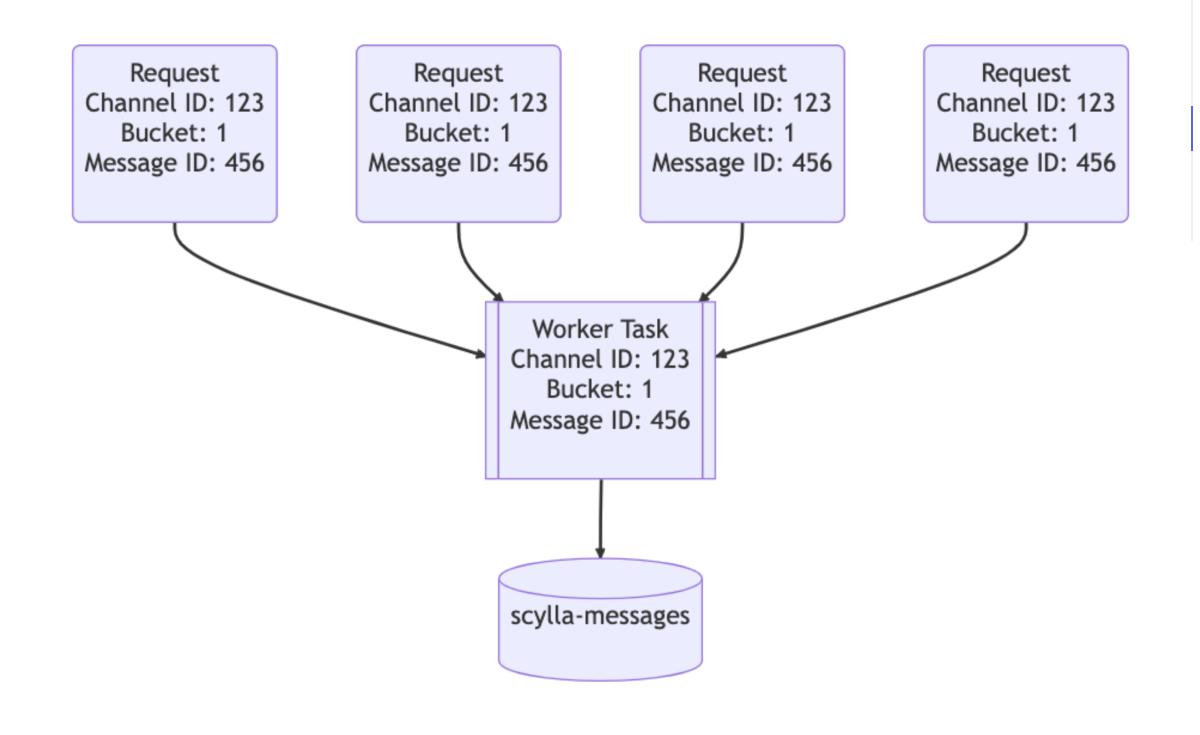
2. **Upstream of data services**: Here they implemented hash-based routing which means for each request, the data service provides a routing key. for messages its channel_id, So every query for messages in the same channel hits the same instance of data service which also prevents hot partitions.
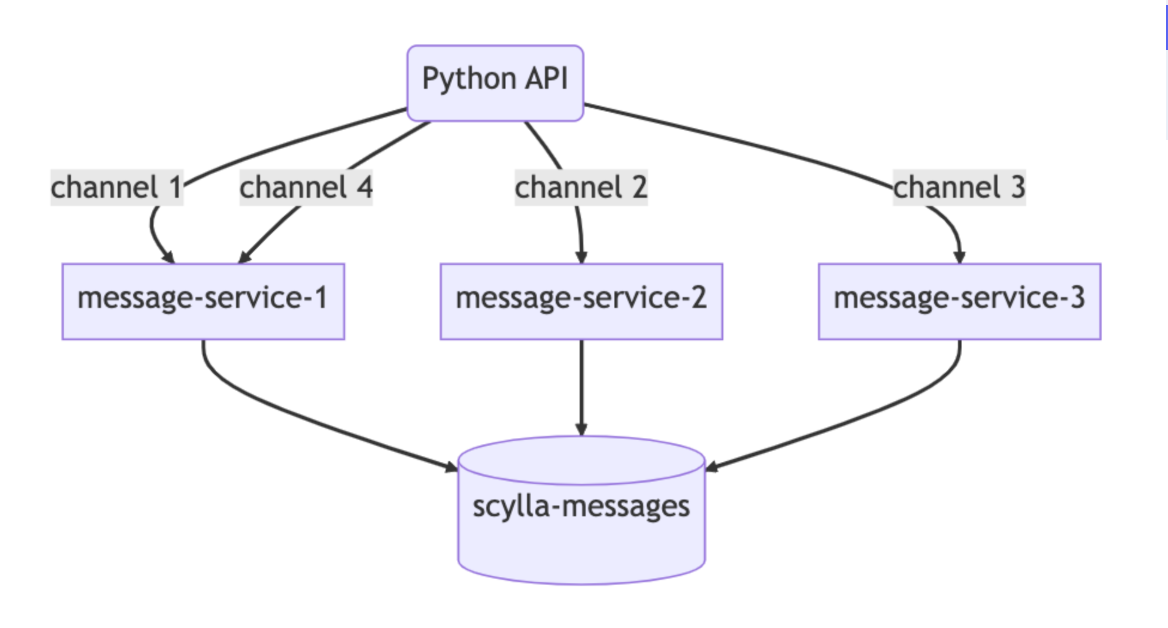
And, that's it.
This is how Discord handles trillions of data.
Ok, a small request.
if you found the above stuff helpful or even bad, do let me know as feedback.
You can comment here or reach me at [@okshubhh](https://twitter.com/okshubhh)
fin.
---
# Razorpay Integration with Reactjs and Node.js(Every scenario — Success, Failure, TimedOut, Cancel)
> A mini blog tutorial which will help the React devs to integrate Razorpay sdk in React code.
- Author: [Shubhdeep Chhabra](https://okshubh.in)
- Published: 2023-01-16
- Categories: Tutorial
- Reading time: 6 min read
- URL: https://okshubh.in/writings/razorpay-integration-in-reactjs
- Cover: https://okshubh.in/assets/Razorpay-Integration-with-Reactjs-and-Node/cover.png
---
Yes, you read it correctly! Here in this blog cum our one-to-one conversation we will be discussing how to integrate Razorpay payment gateway in reactjs with APIs written in Node.js.
By the way, logic will remain the same so it doesn’t matter what languages are. So, let's start-
**Step 1:** Create an account on Razorpay here — [Razorpay Dashboard](https://dashboard.razorpay.com/) and get your **_Key Id_** and **_Key Secret._**
You will get them in Settings -> API keys.
Note- Just check and confirm that you are in Test Mode.
**Step 2:** I’ll name this step “Gyaan Charcha” in simple words “Knowledge Session” because in this step we will understand how Razorpay payment gateway works. What is the flow of the Razorpay payment gateway?
These steps are the main blocks of payment flow in Razorpay-
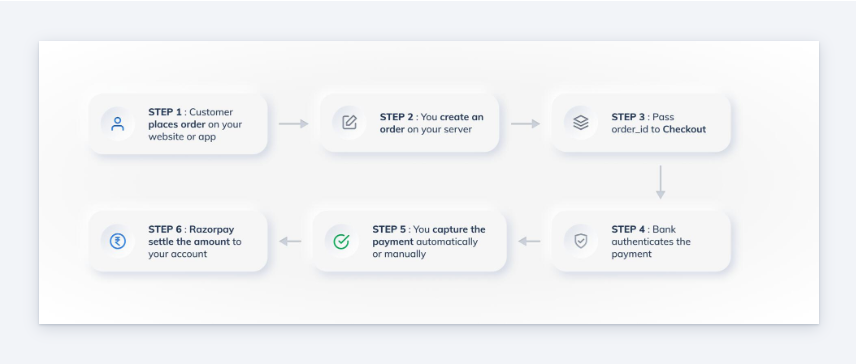
1. The customer creates an Order.
2. Razorpay creates an order id for it, which we use in our integration.
3. Using the order id a checkout UI is opened, in which the customer enters the details and selects payment methods, and pays the amount.
4. Then, this single payment gets a payment id which gets processed and we get razorpay_signature, razorpay_order_id, and razorpay_payment_id in response.
5. Then, we have to authorize and capture this payment in order to settle and complete the whole transaction.
In the coming steps, we will be creating and handling these pointers.
**Step 3:** Let’s code now.
Note — Please read the comments because I tried to cover every possible detail in the comments.
#### **Backend**
Initializing Razorpay
```js
const Razorpay = require('razorpay');
```
API route for creating an order
```js
app.post('/order', async (req, res) => {
// initializing razorpay
const razorpay = new Razorpay({
key_id: req.body.keyId,
key_secret: req.body.keySecret,
});
// setting up options for razorpay order.
const options = {
amount: req.body.amount,
currency: req.body.currency,
receipt: 'any unique id for every order',
payment_capture: 1,
};
try {
const response = await razorpay.orders.create(options);
res.json({
order_id: response.id,
currency: response.currency,
amount: response.amount,
});
} catch (err) {
res.status(400).send('Not able to create order. Please try again!');
}
});
```
For accepting and validating payment
```js
app.post('/payment', async (req, res) => {
// Here you can retrieve the transaction id and amount from client.
});
```
**Step 4:**
**Frontend**
Basic code for a button with hard-coded values
```js
const [displayRazorpay, setDisplayRazorpay] = useState(false);
const [orderDetails, setOrderDetails] = useState({
orderId: null,
currency: null,
amount: null,
});
const handleCreateOrder = async (amount, currency) => {
const data = await axios.post(serverBaseUrl + '/order',
{
amount: amount*100, //convert amount into lowest unit. here, Dollar->Cents
currency,
keyId: process.env.REACT_APP_RAZORPAY_KEY_ID,
KeySecret: process.env.REACT_APP_RAZORPAY_KEY_SECRET,
}
);
if(data && data.order_id){
setOrderDetails({
orderId: data.order_id,
currency: data.currency,
amount: data.amount,
});
setDisplayRazorpay(true);
};
return (
{displayRazorpay && (
}
);
```
Now, the code for rendering Razorpay
```js
import { useEffect, useRef } from 'react';
import crypto from 'crypto-js';
import PropTypes from 'prop-types';
import Axios from 'axios';
// Function to load script and append in DOM tree.
const loadScript = src => new Promise((resolve) => {
const script = document.createElement('script');
script.src = src;
script.onload = () => {
console.log('razorpay loaded successfully');
resolve(true);
};
script.onerror = () => {
console.log('error in loading razorpay');
resolve(false);
};
document.body.appendChild(script);
});
const RenderRazorpay = ({
orderId,
keyId,
keySecret,
currency,
amount,
}) => {
const paymentId = useRef(null);
const paymentMethod = useRef(null);
// To load razorpay checkout modal script.
const displayRazorpay = async (options) => {
const res = await loadScript(
'https://checkout.razorpay.com/v1/checkout.js',
);
if (!res) {
console.log('Razorpay SDK failed to load. Are you online?');
return;
}
// All information is loaded in options which we will discuss later.
const rzp1 = new window.Razorpay(options);
// If you want to retreive the chosen payment method.
rzp1.on('payment.submit', (response) => {
paymentMethod.current = response.method;
});
// To get payment id in case of failed transaction.
rzp1.on('payment.failed', (response) => {
paymentId.current = response.error.metadata.payment_id;
});
// to open razorpay checkout modal.
rzp1.open();
};
// informing server about payment
const handlePayment = async (status, orderDetails = {}) => {
await Axios.post(`${serverBaseUrl}/payment`,
{
status,
orderDetails,
});
};
// we will be filling this object in next step.
const options = {},
useEffect(() => {
console.log('in razorpay');
displayRazorpay(options);
}, []);
return null;
};
export default RenderRazorpay;
```
Now, the most important part of the integration
```js
const options = {
key: keyId, // key id from props
amount, // Amount in lowest denomination from props
currency, // Currency from props.
name: 'My custom title', // Title for your organization to display in checkout modal
// image, // custom logo url
order_id: orderId, // order id from props
// This handler menthod is always executed in case of succeeded payment
handler: (response) => {
console.log('succeeded');
console.log(response);
paymentId.current = response.razorpay_payment_id;
// Most important step to capture and authorize the payment. This can be done of Backend server.
const succeeded =
crypto.HmacSHA256(`${orderId}|${response.razorpay_payment_id}`, keySecret).toString() ===
response.razorpay_signature;
// If successfully authorized. Then we can consider the payment as successful.
if (succeeded) {
handlePayment('succeeded', {
orderId,
paymentId,
signature: response.razorpay_signature,
});
} else {
handlePayment('failed', {
orderId,
paymentId: response.razorpay_payment_id,
});
}
},
modal: {
confirm_close: true, // this is set to true, if we want confirmation when clicked on cross button.
// This function is executed when checkout modal is closed
// There can be 3 reasons when this modal is closed.
ondismiss: async (reason) => {
const { reason: paymentReason, field, step, code } = reason && reason.error ? reason.error : {};
// Reason 1 - when payment is cancelled. It can happend when we click cross icon or cancel any payment explicitly.
if (reason === undefined) {
console.log('cancelled');
handlePayment('Cancelled');
}
// Reason 2 - When modal is auto closed because of time out
else if (reason === 'timeout') {
console.log('timedout');
handlePayment('timedout');
}
// Reason 3 - When payment gets failed.
else {
console.log('failed');
handlePayment('failed', {
paymentReason,
field,
step,
code,
});
}
},
},
// This property allows to enble/disable retries.
// This is enabled true by default.
retry: {
enabled: false,
},
timeout: 900, // Time limit in Seconds
theme: {
color: 'green', // Custom color for your checkout modal.
},
};
```
**Step 5:** Now let’s pay.
Here’s how it looks
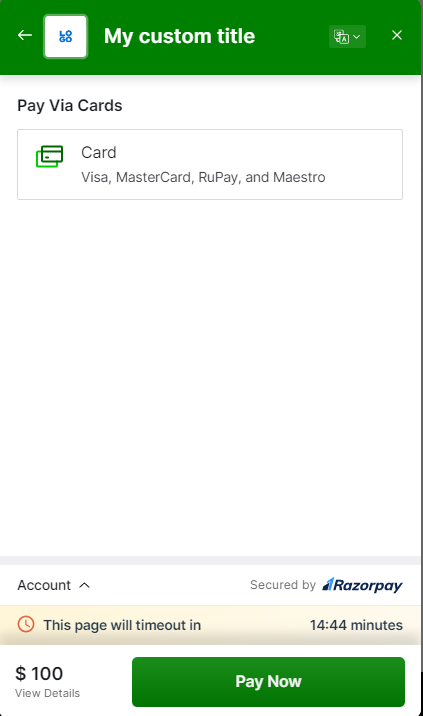
Here are some important links which might be helpful for you:
- [https://dashboard.razorpay.com/](https://dashboard.razorpay.com/)
- [https://razorpay.com/docs/payments/payment-gateway/web-integration/standard/](https://razorpay.com/docs/payments/payment-gateway/web-integration/standard/)
- [https://razorpay.com/docs/payments/payment-gateway/web-integration/standard/test-integration/](https://razorpay.com/docs/payments/payment-gateway/web-integration/standard/test-integration/)
On that note, I’ll take a leave until the next blog.
We will learn something new next blog for sure.
Bye.
If you are reading this blog till here then do follow me on X — [@okshubhh](https://twitter.com/okshubhh)
final bye.
---
# What are Design Tokens? How to Create Design tokens in React?
> Discussed the crucial part of Frontend development viz. Design Tokens.
- Author: [Shubhdeep Chhabra](https://okshubh.in)
- Published: 2022-11-04
- Categories: Frontend
- Reading time: 4 min read
- URL: https://okshubh.in/writings/design-tokens-nextjs
- Cover: https://okshubh.in/assets/What-are-Design-Tokens-How-to-Create-Design-tokens-in-React/cover.png
---
Have you ever heard of **Design tokens**?
**Design tokens**, to put it simply, are all the CSS-related values of your product that are kept in one location and utilized as needed.
Simple? Isn't it?😅
And it is more simple to use and implement also.
Let's deep dive and learn how to create one 🚀🚀.
We will be creating a React app with a CSS-in-JS library named **Styled Components**.
[Styled Components Basics](https://styled-components.com/docs/basics) would be helpful if you are new to the Styled Components.
Just want to let you know, we will not learn how to write code instead we will be focusing on the practice to store and create design tokens in an app.
Let's begin the steps: -
- Install Styled Components and create a new **React app** using the [Guide to construct a new React App] (https://create-react-app.dev/docs/getting-started/).
OR
You may make use of your ongoing project.
- Create a basic component, for now, I am creating a profile card. Make a profile card as seen below without worrying about the design token.
If you are creating on your own, otherwise 👇
Here is the code for that component.
[**_Codesandbox link_**](https://codesandbox.io/s/profilecard-without-design-tokens-kkectn)
There are no design tokens in this.
- Now there is a task for you -> change the color of the button and all social media links and decrease the size of the text by 2px.
Hope you completed the task, So I want to ask my last question here - don't you feel that you kept changing the same value at different locations?
If yes, I think you understand the need for design tokens.
Let's create some.
Here is the [**_Codesandbox link_**](https://codesandbox.io/s/profilecard-with-design-tokens-bwbv8x) of the project but with design tokens.
Understanding how we developed the design token is crucial.
For the sake of the example, we made an object with two keys that represented the theme: light and dark.
```js
export default {
light: {
fontSize: {
text: {
small: 20,
medium: 23,
large: 30,
},
button: {
small: 15,
medium: 17,
large: 20,
},
},
color: {
text: {
primary: '#252525',
secondary: '#26235C',
white1: '#FFFFFF',
},
background: {
primary: '#FFFFFF',
},
border: {
primary: '#26235C',
},
button: {
blue1: '#26235C',
},
icon: {
blue1: '#26235C',
yellow1: '#F7DF1E',
black1: '#000000',
},
},
fontWeight: {
small: 200,
medium: 400,
large: 700,
},
},
dark: {
fontSize: {
text: {
small: 20,
medium: 23,
large: 30,
},
button: {
small: 15,
medium: 17,
large: 20,
},
},
color: {
text: {
primary: '#FFFFFF',
secondary: '#A79AE0',
white1: '#FFFFFF',
},
background: {
primary: '#26235C',
},
border: {
primary: '#A79AE0',
},
button: {
blue1: 'rgba(144, 130, 236, 0.65)',
},
icon: {
blue1: '#A79AE0',
yellow1: '#F7DF1E',
black1: '#000000',
},
},
fontWeight: {
small: 200,
medium: 400,
large: 700,
},
},
};
```
You can see that we assigned values for text size, button color, background color, and all other CSS attributes used in our profile card here.
And these are used everywhere instead of hard coding the colors.
We now have a central location for changing the CSS properties like button color, etc wherever needed.
Isn't that easy?
And design tokens are exactly this.
Although not all aspects, such as having distinct styles for various screen sizes, are covered by this example.
But understanding is sufficient to begin making your own **Design Tokens**.
Depending on the product, a design token may have a variety of layers.
That's the end of this blog.
I hope you find this helpful. 🙌 Please tell me in the comments. 📪
Happy reading
For more of this type of stuff, follow me on X — [@okshubhh](https://twitter.com/okshubhh)
---
# Structuring SEO and Format of a page in Next.js Effectively
> Discussed avery great way of setting up SEO and format for every page in Next.js
- Author: [Shubhdeep Chhabra](https://okshubh.in)
- Published: 2022-09-10
- Categories: SEO
- Reading time: 2 min read
- URL: https://okshubh.in/writings/seo-format-nextjs
- Cover: https://okshubh.in/assets/Structuring-SEO-and-Format-of-a-page-in-Nextjs-Effectively/cover.png
---
Organizing your Next.js application and using components.
Imagine you want to use Next.js to build an application and that you want each page to have a distinct SEO strategy as well as the same header, footer, and navbar.
What you can manage to do?
The simple option is to build a shared component that is called repeatedly on each page.
But, You might try this 👇
- I hope you have already developed a Next.js app before reading this. If not, visit this page 👉 [https://nextjs.org/docs/getting-started](https://nextjs.org/docs/getting-started)
- Create two components with the names **Format** and SEOSetup in a new folder called **components** inside the src directory. This component, “Format,” refers to the layout of the page. Here, in this case, the layout of every page will be in this flow **Navbar** then **Main** content, and then a **Footer**. And, We are therefore defining it below 👇
```js
import { FC } from 'react'
import Footer from '../Footer'
import Navbar from '../Navbar'
const Format: FC = (props) => {
return (
<>
{props.children}
)
}
export default Format
```
- In **SEOSetup**, we’re really constructing a common tag with data supplied as props for the meta and title tag fields. So that we may utilize this **SEOSetup** component each time we need to define SEO-related information on a page rather than creating a head tag repeatedly.
```js
import Head from 'next/head'
export interface MetaData {
title: string;
description: string;
}
const SEOSetup: FC = (props) => {
const { title, description } = props
return (
{title}
)
}
export default SEOSetup
```
- Finally, utilize them on a page. Here we are just wrapping the page with the Format component and setting up SEO with our custom **SEOSetup** tag.
```js
import type { NextPage } from 'next'
import Format from '../components/Format'
import SEOSetup from '../components/SEOSetup'
const Home: NextPage = () => {
return (
This is Home Page.
)
}
export default Home
```
⭐️ ⭐️ THE END ⭐️️️️️ ⭐️
I hope you find this helpful. 🙌 Please tell me in the comments. 📪
For more of this type of stuff, follow me on X — [@okshubhh](https://twitter.com/okshubhh)